


Introduction
In the rapidly evolving landscape of frontend development, the role of the module bundler remains central to building performant, scalable web applications. While the ecosystem is constantly buzzing with JavaScript Vite News and the emergence of Rust-based tools like JavaScript Turbopack News, Webpack continues to be the industry standard for enterprise-grade applications. Understanding Webpack is not just about configuration; it is about mastering the delivery of your JavaScript, CSS, and assets to the browser in the most efficient way possible.
As we navigate through the latest JavaScript Webpack News, it becomes clear that Webpack 5 has matured into a stable, powerful beast capable of handling everything from simple single-page applications to complex micro-frontends via Module Federation. Whether you are working with JavaScript React News, scaffolding a project based on JavaScript Vue.js News, or maintaining a legacy JavaScript Angular News codebase, the bundler is the engine that compiles your dependency graph.
This article provides a comprehensive technical deep dive into Webpack. We will explore core configurations, handle modern asset management, implement asynchronous loading for performance, and discuss where Webpack fits amidst competitors like JavaScript Rollup News and JavaScript Parcel News. We will also touch upon how this integrates with the broader ecosystem, including server-side runtimes like JavaScript Node.js News and testing frameworks like JavaScript Jest News.
Section 1: The Core Concepts and Configuration
At its heart, Webpack is a static module bundler for modern JavaScript applications. When Webpack processes your application, it builds a dependency graph that maps every module your project needs and generates one or more bundles. Understanding the four core concepts—Entry, Output, Loaders, and Plugins—is essential for any developer looking to move beyond “create-react-app” abstraction.
The Dependency Graph and Entry Points
The entry point indicates which module Webpack should use to begin building out its internal dependency graph. By default, its value is ./src/index.js, but you can configure it to handle multiple entry points, which is crucial for multi-page applications or separating app logic from vendor libraries.
In the context of JavaScript TypeScript News, configuring the entry point often involves pointing to a .ts file and ensuring the resolution system understands TypeScript extensions. Below is a foundational configuration setup that demonstrates how to set up a robust environment.
const path = require('path');
const HtmlWebpackPlugin = require('html-webpack-plugin');
const webpack = require('webpack');

/**
 * Basic Webpack Configuration
 * This setup handles the entry point, output directory,
 * and resolves extensions for a modern JS/TS project.
 */
module.exports = {
  // Mode can be 'development' or 'production'
  mode: 'development',

  // Entry point: The start of the dependency graph
  entry: {
    main: path.resolve(__dirname, './src/index.js'),
  },

  // Output: Where the bundles will be emitted
  output: {
    path: path.resolve(__dirname, './dist'),
    filename: '[name].[contenthash].js', // Cache busting
    clean: true, // Cleans the /dist folder before each build (Webpack 5 feature)
  },

  // Resolve: Helps Webpack find modules
  resolve: {
    extensions: ['.js', '.jsx', '.ts', '.tsx', '.json'],
  },

  // Plugins: Extend Webpack capabilities
  plugins: [
    new HtmlWebpackPlugin({
      title: 'Webpack News Demo',
      template: path.resolve(__dirname, './src/template.html'),
    }),
    // Define global variables
    new webpack.DefinePlugin({
      'process.env.NODE_ENV': JSON.stringify('development'),
    }),
  ],

  // DevServer configuration for local development
  devServer: {
    static: path.resolve(__dirname, './dist'),
    port: 3000,
    open: true,
    hot: true, // Hot Module Replacement
  },
};
This configuration utilizes HtmlWebpackPlugin, a standard in the industry, to inject the bundled JavaScript into your HTML automatically. The use of [contenthash] in the output filename is a best practice for long-term caching, ensuring that users only download new bundles when the content has actually changed.
Loaders: Transforming Files
Webpack understands JavaScript and JSON natively. To process other types of files—like converting TypeScript to JavaScript, or compiling SCSS to CSS—you use loaders. This is where tools like JavaScript Babel News and JavaScript SWC News come into play. Babel remains the most popular transpiler, allowing you to write modern ES6+ code that works in older browsers.

Section 2: Implementation Details and DOM Manipulation
Modern web development isn’t just about bundling logic; it’s about interacting with the Document Object Model (DOM) and managing assets effectively. In the past, developers relied on file-loader and url-loader. However, recent JavaScript Webpack News highlights the shift to “Asset Modules” in Webpack 5, which simplifies the configuration significantly.
Handling Styles and Assets
To style an application built with frameworks like JavaScript Svelte News or JavaScript SolidJS News, you need to handle CSS extraction. While development usually relies on style-loader (injecting styles into the DOM), production builds benefit from MiniCssExtractPlugin.
Let’s look at a practical example. We will create a module that manipulates the DOM, requires CSS, and uses an image asset. This demonstrates how Webpack bundles non-JS resources and makes them available to your JavaScript logic.
// webpack.config.js rules addition
/*
module: {
  rules: [
    {
      test: /\.css$/i,
      use: ['style-loader', 'css-loader'],
    },
    {
      test: /\.(png|svg|jpg|jpeg|gif)$/i,
      type: 'asset/resource', // Webpack 5 Asset Module
    },
  ],
},
*/

// src/component.js
import './styles.css';
import logo from './assets/logo.png';

/**
 * Creates a DOM element with an image and text.
 * Demonstrates DOM manipulation within a bundled module.
 *
 * @param {string} text - The text to display
 * @returns {HTMLElement} The created div element
 */
export function createBanner(text) {
  const container = document.createElement('div');
  container.classList.add('banner-container');

  // Create and append image
  const img = new Image();
  img.src = logo; // Webpack resolves this path to the final output URL
  img.classList.add('banner-logo');
  container.appendChild(img);

  // Create and append text
  const heading = document.createElement('h2');
  heading.textContent = text;
  container.appendChild(heading);

  // Add interaction
  container.addEventListener('click', () => {
    container.style.backgroundColor = '#f0f0f0';
    console.log('Banner clicked!');
  });

  return container;
}

// Usage in src/index.js
// document.body.appendChild(createBanner('Welcome to Webpack 5'));
In this example, the import logo from './assets/logo.png' statement is processed by Webpack’s Asset Module. Webpack moves the image to the output directory and replaces the variable logo with the final public URL path. This seamless integration allows developers working with JavaScript Preact News or JavaScript Lit News to treat assets as module dependencies.
Section 3: Advanced Techniques: Async, APIs, and Code Splitting
Performance is the primary metric for modern web applications. If you are building a massive dashboard with JavaScript Next.js News or JavaScript Remix News, you cannot afford to ship the entire application bundle to the client on the initial load. This is where Code Splitting and Asynchronous Imports come into play.
Dynamic Imports and API Integration
Webpack allows you to split your code into various bundles which can then be loaded on demand or in parallel. This is achieved using the dynamic import() syntax. This is particularly relevant when fetching data from an API where the rendering logic for the data might be heavy and not needed immediately.
The following example demonstrates an asynchronous function that fetches data from a public API and dynamically loads a formatting utility only when the data is successfully retrieved. This pattern is essential for optimizing the “Time to Interactive” metric.
/**
 * Fetches user data and dynamically loads a formatter to display it.
 * Demonstrates Async/Await, Fetch API, and Webpack Code Splitting.
 */
async function loadUserData(userId) {
  const userContainer = document.getElementById('user-profile');
  userContainer.innerHTML = '<p>Loading data...</p>';

  try {
    // 1. Fetch Data from API
    const response = await fetch(`https://jsonplaceholder.typicode.com/users/${userId}`);

    if (!response.ok) {
      throw new Error(`API Error: ${response.status}`);
    }

    const userData = await response.json();

    // 2. Dynamic Import (Code Splitting)
    // Webpack will create a separate chunk for 'userFormatter.js'
    // This file is only downloaded if the API call succeeds.
    const { formatUserCard } = await import(
      /* webpackChunkName: "user-formatter" */
      './utils/userFormatter'
    );

    // 3. Render Data
    userContainer.innerHTML = '';
    const userCard = formatUserCard(userData);
    userContainer.appendChild(userCard);

  } catch (error) {
    console.error('Failed to load user:', error);
    userContainer.innerHTML = `<p class="error">Error loading user profile.</p>`;
  }
}

// Trigger the async operation
document.getElementById('load-btn').addEventListener('click', () => {
  loadUserData(1);
});
In the code above, the comment /* webpackChunkName: "user-formatter" */ is a “Magic Comment.” It tells Webpack to name the generated bundle user-formatter.bundle.js instead of a random ID. This level of control is why frameworks like JavaScript Nuxt.js News and JavaScript Blitz.js News rely heavily on Webpack (or compatible bundlers) under the hood to manage route-based code splitting.
Module Federation: The Micro-Frontend Revolution
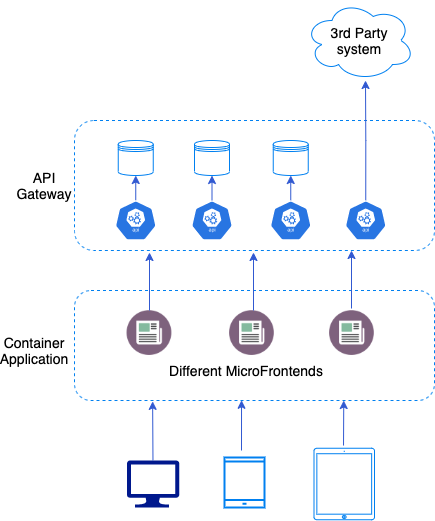
One of the most significant pieces of JavaScript Webpack News in recent years is Module Federation. This feature allows multiple separate builds to form a single application. It essentially allows a JavaScript application to dynamically load code from another application—a separate Webpack build—at runtime.
This is a game-changer for teams using JavaScript Micro-frontends. You might have a header component built in JavaScript React News and a sidebar built in JavaScript Vue.js News (though mixing frameworks requires care), both deployed independently but consumed by a host application.
// webpack.config.js for a Remote App (e.g., a component library)
const { ModuleFederationPlugin } = require('webpack').container;

module.exports = {
  // ... standard config ...
  plugins: [
    new ModuleFederationPlugin({
      name: 'app_components', // The name of this remote
      filename: 'remoteEntry.js', // The entry file for the host to consume
      exposes: {
        './Button': './src/components/Button', // Exposing a specific component
        './Header': './src/components/Header',
      },
      shared: {
        react: { singleton: true },
        'react-dom': { singleton: true }
      },
    }),
  ],
};
Section 4: Optimization, Best Practices, and the Ecosystem
While Webpack is powerful, it requires careful optimization to prevent bundle bloat. As the ecosystem expands with JavaScript Snowpack News and JavaScript Vite News pushing for unbundled development servers, Webpack has responded with improved caching and tree-shaking algorithms.
Tree Shaking and Production Mode
Tree shaking is a term commonly used in the JavaScript context for dead-code elimination. It relies on the static structure of ES2015 module syntax (import and export). Webpack 5 improved this significantly by analyzing the export usage within modules. To ensure this works, always use mode: 'production' for your final builds and avoid side-effects in your modules where possible.
The Broader JavaScript Ecosystem
Webpack does not exist in a vacuum. It is part of a massive toolchain. When setting up a modern project, you are likely integrating:
- Linting and Formatting: JavaScript ESLint News and JavaScript Prettier News are mandatory for maintaining code quality. They can be integrated directly into Webpack via plugins or run as separate scripts.
- Testing: Whether you are using JavaScript Jest News for unit testing, JavaScript Vitest News for a faster alternative, or end-to-end tools like JavaScript Cypress News, JavaScript Playwright News, and JavaScript Puppeteer News, your build process must account for test environments. Often, this means having a separate webpack config for testing or using tools that handle transformations natively (like
ts-jest). - Server-Side Runtimes: While Webpack is primarily for the browser, it is often used to bundle server-side code for JavaScript Node.js News, JavaScript Deno News, or the newer JavaScript Bun News environments, especially when using serverless functions.
- Framework Diversity: The configuration strategies differ slightly whether you are using JavaScript Alpine.js News for lightweight interactivity, JavaScript Mithril.js News for performance, or full-stack frameworks like JavaScript RedwoodJS News. However, the underlying concept of the dependency graph remains constant.
Webpack vs. The Competition
It is impossible to discuss JavaScript Webpack News without addressing the competition. JavaScript Vite News has gained immense popularity due to its instant server start (using ES modules) and fast HMR. JavaScript Turbopack News (from the creators of Webpack) promises to be the successor, written in Rust for speed. JavaScript Rollup News remains the preferred choice for libraries due to its efficient flat bundling.
However, Webpack remains the most flexible. If you need complex custom loaders, specific legacy browser support via JavaScript Babel News, or advanced Module Federation setups, Webpack is often the only tool that covers all edge cases. Tools like JavaScript Gulp News and JavaScript Grunt News are largely considered legacy for bundling but are still used for task running in older projects.
Conclusion
Despite the influx of new tools like Vite and Turbopack, Webpack remains a cornerstone of the JavaScript ecosystem. Its ability to handle complex asset graphs, coupled with the power of Module Federation, keeps it relevant for large-scale application development. From setting up basic entry points to managing asynchronous API calls and optimizing production builds with tree shaking, mastering Webpack gives you granular control over your application’s performance.
As you continue your development journey—whether you are exploring JavaScript Qwik News, building desktop apps with JavaScript Electron News and JavaScript Tauri News, or developing mobile apps with JavaScript Ionic News and JavaScript React Native News—understanding the mechanics of bundling will make you a more effective engineer. The tools may change, but the principles of dependency management and asset optimization are here to stay.
Keep an eye on the evolution of JavaScript Turbopack News as the potential successor, but for now, ensure your Webpack 5 configurations are optimized, your loaders are up to date, and your code splitting strategies are effectively reducing your initial load times.