


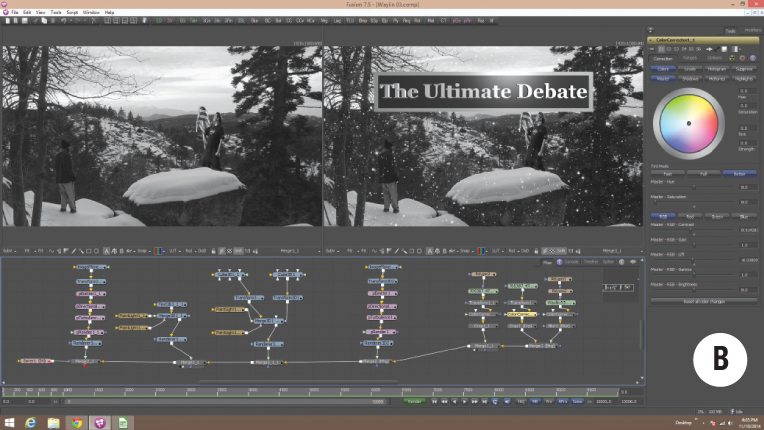
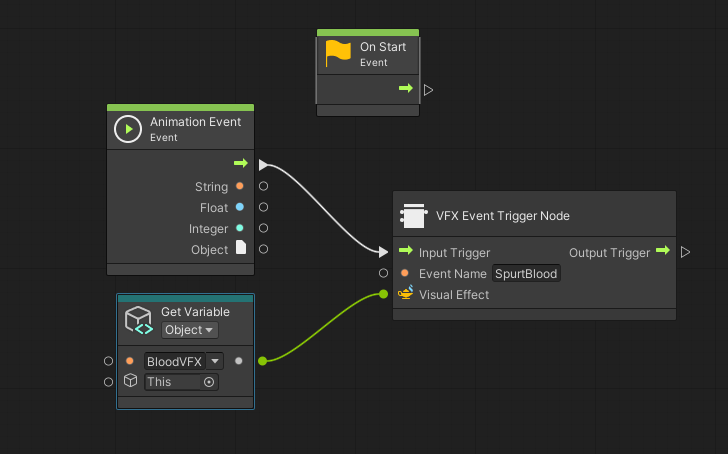
In the rapidly evolving landscape of web development, the line between “developer tools” and “end-user interfaces” is becoming increasingly blurred. One of the most exciting developments dominating recent JavaScript Vue.js News is the democratization of visual scripting. Historically, visual logic editors—interfaces where users connect nodes with wires to create logic flows—were the domain of high-end 3D software or proprietary game engines. However, with the maturation of the web platform, we are seeing a surge in standalone NPM packages that allow developers to embed these powerful “No-Code” editors directly into their Vue.js applications.
This article explores the technical architecture required to implement visual scripting editors in Vue 3, the benefits of decoupling logic from UI, and how this trend fits into the broader JavaScript ecosystem. Whether you are building a workflow automation tool, a chatbot builder, or a creative coding platform, understanding how to manipulate the DOM for complex graph rendering and managing async execution flow is essential.
The Evolution of Visual Logic in the JavaScript Ecosystem
The concept of visual programming isn’t new, but its accessibility via standard NPM packages is a game-changer. Following trends in JavaScript React News, we saw libraries like React Flow gain immense popularity. Now, the JavaScript Vue.js News cycle is highlighting similar capabilities, leveraging Vue’s reactivity system to handle complex graph states efficiently.
When we look at the broader spectrum, including JavaScript Angular News and JavaScript Svelte News, the industry is collectively moving toward “Low-Code” extensibility. Developers are no longer just building forms; they are building engines that allow users to define their own business logic. This shift is evident across the board, from JavaScript Next.js News focusing on server-side rendering of these complex configurations to JavaScript SolidJS News emphasizing the performance required to render thousands of nodes at 60 frames per second.
Why Vue.js for Visual Scripting?
Vue’s Composition API is particularly well-suited for visual editors. A node graph is essentially a deeply nested reactive object containing nodes (state) and edges (relationships). Vue’s proxy-based reactivity allows for seamless updates to the UI when a user drags a node or changes a connection, without the heavy boilerplate often associated with other state management patterns.
Core Concepts: Building the Graph Engine
To implement a visual editor, you need two distinct layers: the Visual Layer (the canvas, nodes, and SVG wires) and the Execution Layer (the engine that interprets the graph). Let’s start by looking at how we might structure the data for a simple visual script.
In a typical implementation, your state might look like a JSON object. Here is a practical example of how to define a graph state using Vue’s reactivity system.
import { reactive, computed } from 'vue';

// The Graph State Manager
export function useGraphEditor() {
    // Reactive state holding nodes and connections
    const graph = reactive({
        nodes: [
            { id: '1', type: 'start', position: { x: 100, y: 100 }, data: { label: 'Start' } },
            { id: '2', type: 'process', position: { x: 400, y: 150 }, data: { action: 'consoleLog', payload: 'Hello World' } }
        ],
        edges: [
            { id: 'e1-2', source: '1', target: '2' }
        ]
    });

    // Helper to add a new node dynamically
    const addNode = (type, position) => {
        const id = `node-${Date.now()}`;
        graph.nodes.push({
            id,
            type,
            position,
            data: {}
        });
        return id;
    };

    // Computed property to derive SVG paths for connections
    const connectionPaths = computed(() => {
        return graph.edges.map(edge => {
            const sourceNode = graph.nodes.find(n => n.id === edge.source);
            const targetNode = graph.nodes.find(n => n.id === edge.target);

            if (!sourceNode || !targetNode) return null;

            // Bezier curve calculation
            return {
                id: edge.id,
                path: `M ${sourceNode.position.x + 150} ${sourceNode.position.y + 25}
                       C ${sourceNode.position.x + 250} ${sourceNode.position.y + 25},
                         ${targetNode.position.x - 100} ${targetNode.position.y + 25},
                         ${targetNode.position.x} ${targetNode.position.y + 25}`
            };
        }).filter(p => p !== null);
    });

    return {
        graph,
        addNode,
        connectionPaths
    };
}
This snippet demonstrates the power of Vue’s computed properties. As nodes are dragged (updating their position), the SVG paths for the wires connecting them are automatically recalculated. This is a staple technique found in JavaScript Nuxt.js News tutorials regarding dynamic SVG generation.
Implementation Details: The Execution Engine
Drawing boxes and lines is only half the battle. The real value comes from executing the logic defined by the visual graph. This requires an asynchronous traversal algorithm. Unlike linear code, a graph can branch, loop, or wait for external events (like API calls).
Apple TV 4K with remote – New Design Amlogic S905Y4 XS97 ULTRA STICK Remote Control Upgrade …
Below is an example of an execution engine that interprets the JSON graph structure. We will simulate an asynchronous operation, similar to what you might see in JavaScript Node.js News regarding flow control, but running entirely in the browser.
// Engine.js - The Logic Runner

/**
 * Executes a single node's logic
 * @param {Object} node - The node configuration
 * @param {Object} context - Global context (variables, api clients)
 */
async function executeNode(node, context) {
    console.log(`Executing Node: ${node.id} (${node.type})`);

    switch (node.type) {
        case 'start':
            return { next: 'default' }; // Proceed to next connected node

        case 'fetchData':
            try {
                // Simulating an API call
                const response = await fetch(node.data.url);
                const json = await response.json();
                context.variables[node.data.outputVar] = json;
                return { next: 'success' };
            } catch (error) {
                console.error("Fetch failed", error);
                return { next: 'failure' };
            }

        case 'log':
            console.log("Log Output:", context.variables[node.data.variable] || node.data.message);
            return { next: 'default' };

        default:
            return { next: null };
    }
}

/**
 * Traverses the graph starting from a specific node
 */
export async function runGraph(graph, startNodeId) {
    let currentNode = graph.nodes.find(n => n.id === startNodeId);
    const context = { variables: {} };

    while (currentNode) {
        // Execute the current node's logic
        const result = await executeNode(currentNode, context);

        // Find the outgoing edge based on the result (e.g., 'success' vs 'failure' path)
        const edge = graph.edges.find(e =>
            e.source === currentNode.id &&
            (e.handle === result.next || e.handle === 'default')
        );

        if (edge) {
            currentNode = graph.nodes.find(n => n.id === edge.target);
        } else {
            currentNode = null; // End of flow
            console.log("Execution finished");
        }
    }
}
This engine pattern is framework-agnostic but integrates beautifully with Vue. You could trigger runGraph from a button click in your Vue component. This approach of decoupling the “Runner” from the “Renderer” is a best practice often discussed in JavaScript TypeScript News, as it allows for strict typing of node interfaces and easier unit testing.
Advanced Techniques: Dynamic Component Rendering
One of the most powerful features of Vue is dynamic component rendering. In a visual editor, every node might require a different UI. A “Color Picker” node needs a color wheel, while a “Request” node needs input fields for URLs. Instead of a massive v-if chain, we can use the <component :is> pattern.
This flexibility is why JavaScript Vite News often highlights Vue’s performance; Vite’s HMR (Hot Module Replacement) makes developing these complex, multi-component systems incredibly fast.
<!-- NodeRenderer.vue -->
<template>
  <div class="node-wrapper" :style="nodeStyle">
    <div class="node-header">{{ node.data.label }}</div>

    <!-- Dynamic Body Content based on Node Type -->
    <div class="node-body">
      <component
        :is="getNodeComponent(node.type)"
        v-model="node.data"
        @update="onNodeUpdate"
      />
    </div>

    <!-- Output Sockets -->
    <div class="socket output" @mousedown="startConnection(node.id)">+</div>
  </div>
</template>

<script setup>
import { computed } from 'vue';
import FetchNodeForm from './nodes/FetchNodeForm.vue';
import LogNodeForm from './nodes/LogNodeForm.vue';
import TimerNodeForm from './nodes/TimerNodeForm.vue';

const props = defineProps(['node']);

const nodeStyle = computed(() => ({
  transform: `translate(${props.node.position.x}px, ${props.node.position.y}px)`
}));

// Map types to Vue components
const componentMap = {
  fetchData: FetchNodeForm,
  log: LogNodeForm,
  timer: TimerNodeForm
};

const getNodeComponent = (type) => {
  return componentMap[type] || 'div';
};

const onNodeUpdate = (newData) => {
  // Logic to sync data back to the global graph state
  console.log('Node data updated:', newData);
};
</script>
This modular approach allows your visual scripting tool to scale. You can create libraries of nodes similar to how JavaScript Alpine.js News discusses lightweight modularity or how JavaScript Remix News emphasizes route-based modularity. By keeping node logic encapsulated in specific components, you maintain a clean architecture.
The Broader JavaScript Ecosystem and Tooling
While this article focuses on Vue, the implementation of visual scripting touches almost every corner of the modern JavaScript stack. When building these tools, you aren’t just writing Vue code; you are interacting with a vast ecosystem.
State Management and Performance
For large graphs with hundreds of nodes, performance becomes critical. JavaScript React News often discusses “concurrent mode,” but in Vue, we look toward optimizations in the reactivity system. Using libraries like Pinia (the successor to Vuex) is standard. However, for extreme performance, you might look into JavaScript Webpack News or JavaScript Turbopack News to optimize your build process, ensuring tree-shaking removes unused node components.
Testing the Visual Logic
Testing a drag-and-drop interface is notoriously difficult. JavaScript Cypress News and JavaScript Playwright News are essential resources here. You need end-to-end tests that simulate a user dragging a wire from Node A to Node B. Furthermore, unit testing the logic engine (as shown in the second code example) is crucial. Tools mentioned in JavaScript Vitest News and JavaScript Jest News are perfect for testing the JSON traversal logic without needing to render the DOM.
Cross-Framework Considerations
If you are building a library intended for public consumption, you might look at JavaScript Lit News or JavaScript Stencil News. These tools allow you to build Web Components that work in Vue, React, and Angular. However, for a native Vue experience, sticking to Vue 3’s core APIs provides the best developer experience (DX).
Apple TV 4K with remote – Apple TV 4K 1st Gen 32GB (A1842) + Siri Remote – Gadget Geek
Best Practices and Optimization
When integrating a visual scripting editor into your Vue application, consider the following best practices to ensure stability and maintainability.
1. Virtualization is Key
If your users create massive graphs, the DOM will become heavy. Just as JavaScript Ag-Grid or other data table libraries use row virtualization, you should implement viewport culling. Only render the nodes and edges currently visible in the user’s viewport. This is a topic frequently covered in JavaScript PixiJS News and JavaScript Three.js News, where rendering efficiency is paramount.
2. Strict Typing with TypeScript
Visual graphs are data-heavy structures. Without strict typing, it is easy to corrupt the graph state (e.g., connecting incompatible data types). Following the trends in JavaScript TypeScript News, you should define interfaces for Node, Edge, and Socket. This ensures that a “String” output cannot be connected to a “Number” input unless a converter node exists.
3. Accessibility (a11y)
Apple TV 4K with remote – Apple TV 4K iPhone X Television, Apple TV transparent background …
Visual editors are inherently visual, which poses accessibility challenges. Ensure that your graph can be navigated via keyboard. JavaScript ESLint News often features plugins for a11y checks. You should ensure that focusing a node allows tab navigation to its sockets and that connections can be made via keyboard commands.
4. Decouple UI from Logic
Do not store the execution logic inside the Vue component. The Vue component should only be responsible for displaying the state. The execution engine should be a pure JavaScript/TypeScript class or function collection. This separation allows you to run the logic on the server side (Node.js) if necessary, a pattern supported by frameworks seen in JavaScript NestJS News and JavaScript Fastify News.
Conclusion
The availability of customizable, standalone visual scripting editors via NPM marks a significant milestone in JavaScript Vue.js News. It signals a maturity in the ecosystem where complex, CAD-like interfaces are no longer the exclusive domain of desktop applications. By leveraging Vue 3’s reactivity, the Composition API, and modern build tools like Vite, developers can empower their end-users to build logic visually.
As we continue to see innovations in JavaScript Next.js News, JavaScript Nuxt.js News, and beyond, the trend toward “Low-Code” integration will likely accelerate. Whether you are using these tools to build internal workflow automation or customer-facing logic builders, the ability to manipulate node graphs in the DOM is now a fundamental skill for the modern senior frontend engineer.
To get started, try building the simple graph engine outlined in this article. Experiment with creating different node types, handling async API calls, and perhaps even integrating a real-time collaboration feature using WebSockets. The barrier to entry has never been lower, and the potential for innovation is limitless.