


In the ever-evolving landscape of web development, the pendulum often swings between bundled simplicity and decoupled complexity. For years, the trend has favored the JAMstack architecture, separating the frontend from the backend with APIs as the middleman. While powerful, this approach introduces significant overhead: managing API endpoints, handling data fetching states, and ensuring type safety across network boundaries. The latest Blitz.js News signals a deliberate swing back towards a more integrated, monolithic development experience, but with a modern twist. Blitz.js is a fullstack React framework built on Next.js that boldly declares a “Zero-API” data layer, aiming to make you more productive than ever before.
This article provides a comprehensive technical deep-dive into Blitz.js. We’ll explore its core philosophy, dissect its architecture, walk through practical code examples, and discuss best practices for building robust applications. Whether you’re tracking React News for the next big thing or are a seasoned developer feeling the fatigue of API boilerplate, Blitz.js presents a compelling alternative that deserves your attention. It challenges the prevailing trends seen in Next.js News and Remix News by offering a tightly integrated solution reminiscent of frameworks like Ruby on Rails, but built for the modern JavaScript and TypeScript ecosystem.
The “Zero-API” Philosophy: Core Concepts of Blitz.js
The cornerstone of Blitz.js is its “Zero-API” data layer. This doesn’t mean there are no APIs; rather, it means you, the developer, don’t have to build or maintain them manually. Blitz abstracts the API layer away, allowing you to write server-side code in a dedicated folder and import it directly into your React components as if it were running in the same process. This architectural choice dramatically simplifies data fetching and mutations, eliminating the need for REST or GraphQL endpoints for your application’s internal data flow.
How the “Zero-API” Layer Works
Under the hood, Blitz uses a compile-time code transformation and an RPC (Remote Procedure Call) mechanism. When you import a server-side query or mutation into a client-side component, the Blitz compiler replaces that import with an automatically generated HTTP API call. This process is completely transparent to the developer. The result is end-to-end type safety, from your database schema (managed by Prisma) all the way to your React components, a significant win for anyone following the latest TypeScript News.
Let’s look at a simple example. Imagine you have a query to fetch a single project from your database.
First, you define the query function in app/projects/queries/getProject.ts. This code runs exclusively on the server.
// app/projects/queries/getProject.ts
import { resolver } from "@blitzjs/rpc";
import db from "db";
import { z } from "zod";

const GetProject = z.object({
  id: z.number(),
});

export default resolver.pipe(
  resolver.zod(GetProject),
  resolver.authorize(), // Ensures the user is logged in
  async ({ id }, ctx) => {
    const project = await db.project.findFirst({
      where: { id, userId: ctx.session.userId },
    });

    if (!project) throw new Error("Project not found");

    return project;
  }
);
Now, you can use this query directly in your React component using the useQuery hook provided by Blitz.
// app/projects/components/ProjectComponent.tsx
import { useQuery } from "@blitzjs/rpc";
import getProject from "app/projects/queries/getProject";

function ProjectComponent({ projectId }) {
  const [project, { isLoading, error }] = useQuery(getProject, { id: projectId });

  if (isLoading) return <div>Loading...</div>;
  if (error) return <div>Error: {error.message}</div>;

  return (
    <div>
      <h1>{project.name}</h1>
      <p>{project.description}</p>
    </div>
  );
}

export default ProjectComponent;
Notice there’s no fetch call, no GraphQL client, and no manual state management for loading or errors. You simply import the server function and use it. This tight integration is a stark contrast to the decoupled architectures often discussed in Node.js News and Express.js News, offering a streamlined path from database to UI.
Getting Started: Scaffolding and Implementation Details
Blitz.js is a “batteries-included” framework. It comes with a powerful CLI that automates the creation of models, queries, mutations, and pages. This convention-over-configuration approach helps developers get up and running quickly and maintain a consistent project structure. The CLI is a significant productivity booster, similar to tools found in frameworks like Ruby on Rails or AdonisJS News.
Using the Blitz CLI
The Blitz CLI is your primary tool for scaffolding out your application’s features. The most powerful command is blitz generate, which can create all the necessary files for a database model, including pages for creating, reading, updating, and deleting (CRUD) entries.
Let’s scaffold a “Task” feature for our project management app. First, you’d define the model in your db/schema.prisma file.
// db/schema.prisma
model Task {
  id          Int      @id @default(autoincrement())
  createdAt   DateTime @default(now())
  updatedAt   DateTime @updatedAt
  title       String
  completed   Boolean  @default(false)
  project     Project  @relation(fields: [projectId], references: [id])
  projectId   Int
}
After migrating the database with blitz prisma migrate dev, you can run a single command to generate all the corresponding code:
blitz generate all task title:string completed:boolean
This command will create:
- Queries:
getTask.tsandgetTasks.ts - Mutations:
createTask.ts,updateTask.ts, anddeleteTask.ts - Pages/Components: React components and Next.js pages for listing, showing, creating, and editing tasks.
This automation drastically reduces boilerplate and lets you focus on building unique features. While other ecosystems have similar tools, the integration in Blitz feels seamless, connecting the database schema directly to the frontend components.
Authentication and Authorization
Authentication and authorization are notoriously difficult to implement correctly. Blitz provides a full auth system out of the box, including sign-up, login, logout, and password reset functionality. Authorization is handled elegantly through middleware in your queries and mutations. The resolver.authorize() call in our earlier example is a simple way to ensure only authenticated users can access a specific query. You can also pass roles or permissions for more granular control.
Advanced Techniques and Real-World Applications
While the “Zero-API” layer handles most internal data flow, real-world applications often need more complex logic, such as interacting with third-party services, handling file uploads, or performing complex database transactions. Blitz provides clear patterns for these scenarios without breaking its core philosophy.
Complex Mutations and Transactions
Blitz uses Prisma as its default ORM, which has excellent support for database transactions. You can perform multiple database operations within a single mutation, and if any of them fail, the entire transaction is rolled back. This ensures data integrity.
Here’s an example of a mutation that creates a new project and simultaneously assigns the current user as its first team member within a transaction.
// app/projects/mutations/createProject.ts
import { resolver } from "@blitzjs/rpc";
import db from "db";
import { z } from "zod";

const CreateProject = z.object({
  name: z.string().min(3),
  description: z.string().optional(),
});

export default resolver.pipe(
  resolver.zod(CreateProject),
  resolver.authorize(),
  async ({ name, description }, ctx) => {
    const userId = ctx.session.userId;

    // Use Prisma's transaction API
    const project = await db.$transaction(async (prisma) => {
      const newProject = await prisma.project.create({
        data: {
          name,
          description,
          userId, // Set the owner
        },
      });

      // Add the creator to the project's members list
      await prisma.projectMember.create({
        data: {
          projectId: newProject.id,
          userId: userId,
          role: "OWNER",
        },
      });

      return newProject;
    });

    return project;
  }
);
This pattern keeps related business logic encapsulated on the server while remaining callable as a single, atomic function from the client. This is a powerful feature that simplifies state management on the frontend, a topic of constant discussion in Svelte News and Vue.js News circles.
Integrating with Third-Party APIs
For external services, you can’t use the “Zero-API” layer. In these cases, you create standard Next.js API routes. Blitz is built on Next.js, so you retain the full power and flexibility of the underlying framework. You can create a file in app/api/<your-route>.ts and write a standard serverless function to handle webhooks or provide a public API. This hybrid approach allows Blitz to be both highly productive for internal development and flexible enough to integrate with the wider web ecosystem.
Best Practices and Performance Optimization
To get the most out of Blitz.js, it’s important to follow some best practices that align with its architecture. As with any framework, from giants discussed in Angular News to newcomers in SolidJS News, understanding its conventions is key to success.
Structuring Your Code
- Keep Queries and Mutations Lean: Your resolver functions should primarily focus on data access and authorization. Move complex business logic into separate “service” or “domain” modules that can be called from your resolvers. This makes your code more testable and reusable.
- Use the CLI for Consistency: Always use
blitz generateto scaffold new features. This ensures your project follows the established conventions, making it easier for new developers to onboard. - Leverage Zod for Validation: Use Zod for input validation in your resolvers. This provides runtime validation and automatically infers TypeScript types, giving you robust, type-safe code from end to end.
Performance Considerations
- Data Fetching: While
useQueryis simple, be mindful of how much data you’re fetching. Use Prisma’sselectandincludeoptions within your server-side queries to fetch only the data your component needs. - Caching: Blitz queries can be cached on the client. The
useQueryhook comes with options to configure stale time and cache time, allowing you to fine-tune data-fetching behavior and reduce unnecessary network requests. - Bundle Size: Since Blitz is built on Next.js, you benefit from all its performance optimizations, including automatic code splitting. Keep an eye on your bundle size using tools like the Next.js Bundle Analyzer. The ongoing evolution of bundlers, as seen in Vite News and Turbopack News, will continue to bring performance improvements to the ecosystem.
Testing Your Application
Testing in Blitz is straightforward. You can write unit tests for your resolver functions in isolation by mocking the database and session context. For end-to-end testing, tools like Cypress or Playwright work perfectly, as they interact with the final rendered application just like a user would. Keeping up with Jest News and Vitest News will help you choose the right tools for testing your Blitz application’s components and logic.
Conclusion: A Modern Monolith for a Productive Future
Blitz.js presents a compelling vision for the future of fullstack web development. By abstracting away the API layer, it eliminates a massive source of boilerplate and complexity, allowing developers to build features faster and with more confidence. Its “Zero-API” architecture, combined with a powerful CLI and first-class support for authentication, authorization, and TypeScript, creates a development experience that is both simple and powerful.
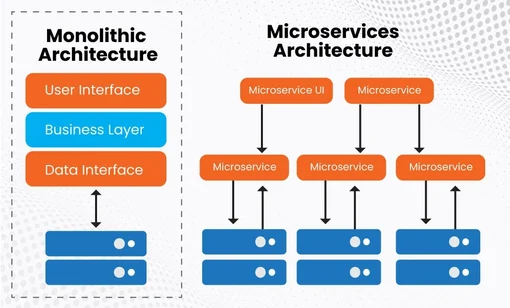
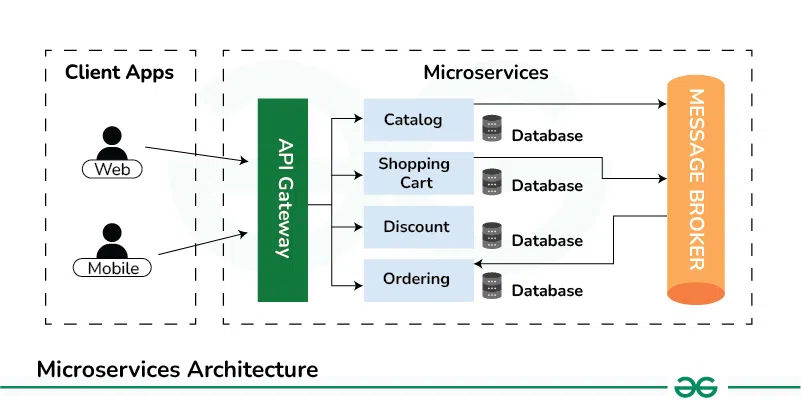
While the industry continues to debate the merits of microservices vs. monoliths, Blitz.js proves that a well-designed, modern monolith can offer unparalleled productivity without sacrificing the benefits of a modern stack. It learns from the simplicity of frameworks like Rails and Django and applies those lessons to the React ecosystem. For teams looking to build and iterate quickly on complex, data-driven applications, Blitz.js is not just an interesting development in the world of JavaScript News; it’s a pragmatic and powerful choice that is ready for production today.
If you’re intrigued by this approach, the next step is to visit the official Blitz.js documentation and try building a small project. The “getting started” guide is excellent, and you’ll quickly experience the “aha!” moment when you call your first server-side query directly from a React component.