


In the ever-evolving landscape of web development, the relentless pursuit of performance remains a constant. Developers are perpetually seeking new techniques to shave milliseconds off load times and improve user experience, with Google’s Core Web Vitals (CWV) serving as a critical benchmark. A key metric, Time to Interactive (TTI), is often hampered by a process known as hydration in Server-Side Rendered (SSR) applications. This is where the latest Nuxt.js News brings a game-changing feature to the forefront: lazy hydration. By intelligently deferring the interactivity of non-critical components, Nuxt.js offers a powerful solution to unblock the main thread and deliver a snappier, more responsive user experience. This development is not just significant for the Vue.js ecosystem but also resonates with trends seen in React News and Angular News, where performance optimization is a central theme. This article provides a comprehensive deep dive into Nuxt’s lazy hydration, exploring its core concepts, practical implementation, advanced strategies, and best practices for modern web applications.
The Hydration Problem: From Static HTML to Interactive App
To fully appreciate the innovation of lazy hydration, we must first understand the standard hydration process and its inherent performance bottlenecks. This concept is fundamental to most modern SSR frameworks, from Nuxt.js to Next.js and Remix.
What is Hydration?
When you use a framework like Nuxt.js with SSR, the server generates the full HTML for a page on the initial request. This static HTML is sent to the browser, which can render it very quickly. This is great for perceived performance and Search Engine Optimization (SEO). However, this HTML is just a “lifeless” representation of your application; it lacks the JavaScript-powered interactivity, like button clicks or form inputs. Hydration is the client-side process where the JavaScript framework (Vue.js, in Nuxt’s case) takes over the static HTML, attaches event listeners, and makes the page fully interactive. You can think of it as bringing a static mannequin to life.
The High Cost of Eager Hydration
The traditional approach, known as “eager” hydration, involves downloading and executing the JavaScript for the entire page at once. As soon as the script loads, it walks the entire DOM tree, attaching functionality to every component. While this ensures the whole page becomes interactive eventually, it creates a significant performance bottleneck. The browser’s main thread becomes busy parsing and executing large JavaScript bundles, which blocks it from responding to user input. This directly leads to a poor TTI and can negatively impact newer metrics like Interaction to Next Paint (INP). A user might see a button and try to click it, but nothing happens until the entire hydration process is complete, leading to a frustrating experience. This challenge is a frequent topic in the wider web development community, with discussions spanning from Svelte News to SolidJS News.
Introducing Lazy Hydration: The Nuxt.js Approach
Lazy hydration flips the script. Instead of hydrating the entire application at once, it selectively hydrates components only when they are needed. This is often achieved through a strategy known as “islands architecture,” where interactive components are treated as isolated “islands” in a sea of static, server-rendered HTML. Nuxt.js implements this concept elegantly, allowing developers to defer the hydration of components until they scroll into the viewport or a user explicitly interacts with them. The immediate benefit is a much lighter initial load, a less-blocked main thread, and a dramatically improved TTI. The initial view is interactive almost instantly, while heavier components below the fold load their JavaScript on demand.
<!-- A component that is a good candidate for lazy hydration due to its complexity -->
<!-- components/ComplexDataChart.vue -->
<script setup>
import { ref, onMounted } from 'vue';
// Imagine this component uses a heavy charting library like D3.js or Chart.js
// import { renderChart } from 'heavy-chart-library';

const chartData = ref({ /* ... complex data ... */ });
const chartEl = ref(null);

onMounted(() => {
  console.log('ComplexDataChart component has mounted and is now interactive!');
  // On mount, we would initialize the heavy library
  // renderChart(chartEl.value, chartData.value);
});
</script>

<template>
  <div class="chart-container">
    <h3>Quarterly Sales Data</h3>
    <div ref="chartEl" class="chart">
      <!-- Chart will be rendered here by a heavy JS library -->
      <p>Loading chart...</p>
    </div>
  </div>
</template>

<style scoped>
.chart-container {
  border: 1px solid #ccc;
  padding: 20px;
  margin-top: 50px;
  min-height: 400px; /* Placeholder height */
}
</style>
Getting Started with Lazy Hydration in Nuxt
Nuxt 3 makes implementing component-level lazy hydration incredibly straightforward through its built-in features, primarily revolving around the concept of “islands.” This approach is powered by modern tooling, with the latest Vite News and Node.js News highlighting advancements in server-side rendering and efficient module loading that make such features possible.

Nuxt.js logo – CSS Modules in Nuxt.js – DEV Community
The `NuxtIsland` Component and `.server` Components
In Nuxt 3, the concept of islands is deeply integrated. While you might see `
Practical Implementation: Using the `lazy` Prefix
The most direct way to lazily load and hydrate a component in Nuxt is by using the `Lazy` prefix when importing it in your template. This tells Nuxt to automatically code-split the component and only load and hydrate it when it enters the viewport. This is a simple yet powerful convention.
<!-- pages/dashboard.vue -->
<template>
  <div>
    <h1>My Dashboard</h1>
    <p>Here is some important, above-the-fold content that should be interactive immediately.</p>

    <!-- Standard component, hydrates eagerly with the main page chunk -->
    <UserProfileCard :user="currentUser" />

    <div style="height: 150vh;">
      <!-- This content pushes the chart off-screen -->
      <p>Scrolling down...</p>
    </div>

    <h2>Performance Metrics</h2>
    <!--
      By using the 'Lazy' prefix, Nuxt will only load and hydrate
      this component when it is about to be scrolled into view.
      The component file is components/ComplexDataChart.vue
    -->
    <LazyComplexDataChart />
  </div>
</template>

<script setup>
const currentUser = { name: 'Jane Doe', status: 'Active' };
</script>
Distinguishing from `ClientOnly`
It’s crucial to distinguish lazy hydration from the `
<!-- A component that should only render on the client -->
<!-- components/BrowserApiWidget.vue -->
<script setup>
import { ref, onMounted } from 'vue';
const windowWidth = ref(0);

onMounted(() => {
  // This code can only run in the browser
  windowWidth.value = window.innerWidth;
});
</script>

<template>
  <div>
    Your window width is: {{ windowWidth }}
  </div>
</template>

<!-- In a page, you would use it like this: -->
<!-- pages/index.vue -->
<template>
  <div>
    <h1>Client-Only Example</h1>
    <ClientOnly>
      <BrowserApiWidget />
      <template #fallback>
        <!-- This will be rendered on the server and initially on the client -->
        <p>Loading widget...</p>
      </template>
    </ClientOnly>
  </div>
</template>
Mastering Lazy Hydration: Advanced Patterns
While viewport-based hydration is the most common use case, Nuxt’s flexibility allows for more sophisticated strategies. By combining lazy loading with conditional rendering, you can gain fine-grained control over your application’s performance, a level of control that is a frequent topic in Next.js News and discussions around React Server Components.
Triggering Hydration on User Interaction
Sometimes, you don’t want to hydrate a component until a user explicitly interacts with it. A perfect example is a comment section. Loading and hydrating a complex comment system for every user, even those who just read the article and leave, is wasteful. A better approach is to show a static placeholder or a “Load Comments” button and only load the interactive component when the user clicks it.
<!-- pages/blog/[slug].vue -->
<template>
  <article>
    <h1>My Awesome Blog Post</h1>
    <div class="post-content">
      <!-- ... article content ... -->
    </div>

    <div class="comments-section">
      <!-- The interactive component is only rendered (and thus loaded/hydrated) -->
      <!-- when the user decides they want to see the comments. -->
      <template v-if="showComments">
        <LazyCommentSystem :post-id="123" />
      </template>
      <template v-else>
        <button @click="showComments = true">
          Load Comments
        </button>
      </template>
    </div>
  </article>
</template>

<script setup>
import { ref } from 'vue';

const showComments = ref(false);
</script>

<style scoped>
.comments-section {
  margin-top: 40px;
  padding: 20px;
  border-top: 1px solid #eee;
}
button {
  padding: 10px 20px;
  font-size: 1rem;
  cursor: pointer;
}
</style>
Debugging and Performance Profiling
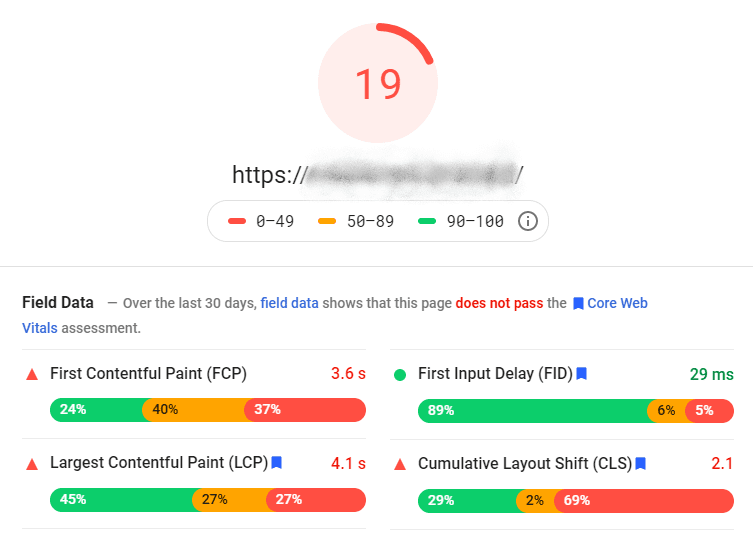
How do you confirm lazy hydration is working? The best tools are your browser’s developer tools. Open the Network tab and filter by “JS”. On the initial page load, you should *not* see the JavaScript chunk for your lazy component. As you scroll down or interact to trigger it, you will see a new JavaScript file being fetched. Additionally, the Performance tab in Chrome DevTools can be used to profile the main thread activity. A page using lazy hydration will show a much shorter “scripting” phase on initial load compared to an eagerly hydrated equivalent. Integrating this with modern testing tools is also key; the latest Cypress News and Playwright News often cover strategies for testing performance characteristics of modern web apps.
Best Practices for Optimal Performance
Like any powerful tool, lazy hydration should be used judiciously. Applying it correctly can yield massive performance wins, but misusing it can lead to a degraded user experience. Here are some best practices to follow.
Identifying Good Candidates for Lazy Hydration
The best candidates are components that are both interactive and non-critical for the initial view. Consider lazily hydrating:
- Below-the-fold content: Any complex component that a user must scroll to see is a prime candidate.
- Complex visualizations: Interactive charts, graphs, and maps often rely on heavy JavaScript libraries.
- Third-party widgets: Chatbots (Intercom), social media embeds (Twitter feeds), and ad components.
- Carousels and sliders: Especially if they contain many high-resolution images.
- Feature-rich footers: If your footer contains interactive elements like a newsletter signup form, it’s a great candidate.
Common Pitfalls to Avoid
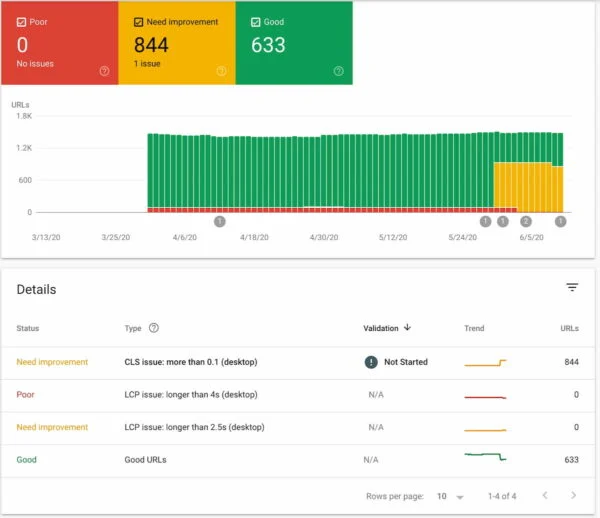
Don’t lazy-hydrate critical UI: Never lazy-hydrate components that are essential for the initial user experience, such as the main navigation, header, or a cookie consent banner. Delaying their interactivity will frustrate users.
Prevent Cumulative Layout Shift (CLS): Ensure that the server-rendered placeholder for your component has a fixed size (using `min-height` or `aspect-ratio`) that matches the final hydrated component. If the placeholder is 0px high and the component suddenly appears with a height of 400px, it will cause a jarring layout shift, negatively impacting your CWV score.
Consider the user experience: For interaction-triggered hydration, provide clear feedback. Use loading spinners or skeleton screens to let the user know that their action has been registered and content is being loaded. The entire development toolchain, from ESLint News on code quality to TypeScript News on type safety, contributes to building these robust user experiences.
Conclusion: The Future is Fast and Lazy
Nuxt.js’s implementation of lazy hydration is a significant step forward for web performance in the Vue ecosystem. It provides developers with an intuitive and powerful mechanism to combat main thread blockage and drastically improve Core Web Vitals like TTI and INP. By moving away from the monolithic, eager hydration model towards a more granular, on-demand approach, Nuxt empowers us to build applications that are not only feature-rich but also incredibly fast and responsive from the very first paint.
As you continue to develop with Nuxt, take the time to audit your applications. Identify those heavy, non-critical components and apply these lazy hydration strategies. The performance gains can be substantial, leading to better user engagement, higher conversion rates, and improved SEO rankings. This feature solidifies Nuxt’s position as a top-tier framework, keeping pace with the latest innovations across the entire JavaScript landscape, from Remix News to the ongoing evolution of build tools covered in Turbopack News.