

For two years the answer to “can I run my pnpm monorepo on Bun?” was “mostly, if you don’t mind hoisting surprises and a lockfile nobody can review.” That changed when Bun shipped the text-based bun.lock in 1.2 and then filled in the workspace feature gaps pnpm users actually care about: protocol-aware dependencies, catalog versions, filtered scripts, and isolated installs that stop phantom imports at the door. If you’ve been maintaining a Turborepo or Nx repo on pnpm and eyeing Bun for the speed, the migration story is now boring in the good way.
This guide walks through what Bun’s workspaces can and can’t do compared to pnpm, how to actually convert a repo, where the edges still show, and which scripts you’ll need to rewrite. The target is anyone running a real monorepo — Next.js plus a Vite package plus a NestJS API plus a shared TypeScript types package — not a toy two-package example.
What “match pnpm” actually means in practice
The pnpm case for monorepos rests on four things: a symlinked node_modules layout that makes phantom dependencies an error instead of a silent bug, the workspace: protocol for internal packages, filtered execution with pnpm --filter, and catalog versions that let you declare React 18.3.1 once and reuse it across twelve packages. Until Bun 1.2 landed, Bun had exactly one of those four — workspaces resolved against internal packages, but the protocol string, the filter flag, and catalogs either didn’t exist or behaved differently enough that CI would break on migration.
As of the current 1.2.x line, Bun’s workspaces documentation covers all four. The workspace:* and workspace:^ protocols resolve the same way pnpm resolves them. bun install --filter runs lifecycle scripts against a subset of the graph. The catalog: protocol reads versions from a top-level catalog field in the root package.json. And the text lockfile means a reviewer can finally see a diff when someone bumps a transitive dependency, which was the single biggest objection enterprise teams had to adopting Bun for shared repos.
The search query “bun workspaces monorepo pnpm” still returns a lot of 2024 posts claiming Bun is missing features. Most of those posts are out of date. The gap that remains is real but narrower than it was: Bun’s default install is still hoisted, not isolated, and that’s the one place a straightforward drop-in migration can bite you.
The minimal working layout
A Bun workspace is declared the same way it is in pnpm, except the globs live in package.json instead of pnpm-workspace.yaml. For a repo with a Next.js app, a Vite-built UI library, and a shared types package, the root looks like this:
“`json
{
“name”: “acme-monorepo”,
“private”: true,
“workspaces”: [
“apps/*”,
“packages/*”
],
“catalog”: {
“react”: “18.3.1”,
“react-dom”: “18.3.1”,
“typescript”: “5.6.3”,
“vite”: “5.4.10”
},
“devDependencies”: {
“typescript”: “catalog:”
}
}
“`
Each workspace package then declares its internal dependencies with the workspace protocol and its third-party pins against the catalog:
“`json
{
“name”: “@acme/ui”,
“version”: “0.1.0”,
“dependencies”: {
“@acme/types”: “workspace:*”,
“react”: “catalog:”
},
“devDependencies”: {
“vite”: “catalog:”,
“typescript”: “catalog:”
}
}
“`
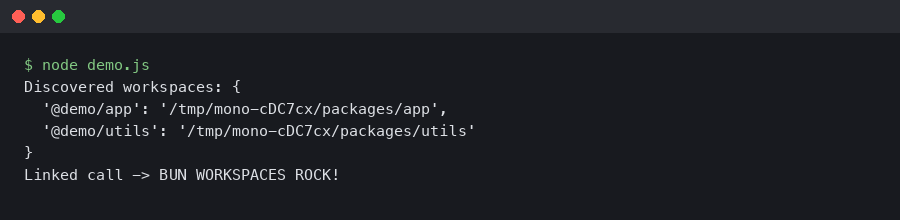
Running bun install at the root produces a single bun.lock at the root and wires every package’s internal references to the on-disk source, not to a published tarball. The catalog: entries are rewritten at install time to the pinned version from the root catalog, so bumping React across the whole monorepo is a one-line change in one file. pnpm users will recognize the pattern exactly from pnpm’s catalog documentation — Bun’s syntax is deliberately compatible so converted repos don’t need per-package rewrites.
Migrating a pnpm repo in place
The cleanest migration path is to delete pnpm-lock.yaml and node_modules, convert pnpm-workspace.yaml into a workspaces field in the root package.json, and run bun install. If you have a catalog: section in pnpm-workspace.yaml, move it to the catalog key of the root package.json. That’s usually all it takes for the install itself to succeed. The breakage, if any, comes afterward during scripts or builds.
Three things tend to bite. First, any script that shells out to pnpm directly needs rewriting — the usual offenders are pnpm -r run build, pnpm --filter ./apps/web run dev, and anything piping through pnpm exec. The Bun equivalents are bun run --filter '*' build, bun run --filter './apps/web' dev, and plain bunx. The filter syntax accepts package names, globs, and relative paths, mirroring pnpm’s behavior closely enough that Turborepo’s turbo run build --filter=web continues to work unchanged because Turbo is doing the filtering, not pnpm.
Second, any package that relied on phantom dependencies — importing lodash without declaring it because pnpm’s hoisting happened to put it in reach — will keep working on Bun, because Bun’s default layout is actually more forgiving than pnpm’s isolated layout. That sounds like a win until you push to a CI environment using --linker isolated and watch it explode. More on that below.
Third, if you run postinstall scripts that use pnpm rebuild or pnpm approve-builds, you need the Bun equivalents. Bun’s trustedDependencies field in the root package.json is the allowlist for packages whose install scripts may run — this is Bun’s answer to the supply-chain lessons from the node-ipc and eslint-scope incidents, and it’s on by default. Sharp, esbuild, and @swc/core are the three you’ll almost always need to add.
“`json
{
“trustedDependencies”: [
“sharp”,
“esbuild”,
“@swc/core”
]
}
“`
Hoisted vs. isolated: the one real gap
pnpm’s biggest architectural bet is that every package should see exactly the dependencies it declared, and nothing else. That’s what the symlinked node_modules/.pnpm store enforces. Bun’s default install is hoisted, which is faster and plays nicer with tools that don’t understand symlinks, but it also means phantom imports compile and run.
Bun 1.2 added an --linker isolated flag that produces a pnpm-style layout with a content-addressed store and per-package symlinks. The behavior and the trade-offs are covered in the Bun install CLI reference. Running bun install --linker isolated once on a converted pnpm repo is the fastest way to find out how many phantom dependencies have been hiding. For a mid-sized Next.js monorepo with fifteen packages, expect to find between three and eight, most of them transitive peer deps that were being pulled up by React or a UI library.
My recommendation for teams on the fence: run hoisted locally for speed and isolated in CI as a correctness check. Put linker = "isolated" in a bunfig.toml inside a CI-specific config directory, or pass the flag explicitly in the workflow file. You get the fast inner loop without shipping broken imports to production.
Filtered scripts and parallel execution
Filtered execution is where Bun’s monorepo story historically felt thinnest. The 1.2 series closed the gap with a --filter flag on both bun install and bun run. The syntax accepts exact package names (--filter @acme/web), globs (--filter '@acme/*'), directory paths (--filter './packages/ui'), and a ... suffix to include dependents. That last one is the feature you need for change-impact builds:
“`bash
bun run –filter ‘@acme/types…’ build
“`
That command builds @acme/types and every package that depends on it, transitively. It’s the same semantics as pnpm --filter @acme/types... build, and for a Turborepo user it replaces the need to run turbo at all for simple cases — though Turbo’s remote cache is still worth keeping for larger graphs. Parallel execution is on by default when the graph allows it; Bun runs topologically-independent packages concurrently and respects dependency order for the rest. You don’t configure a concurrency cap the way pnpm’s --workspace-concurrency does; Bun picks a sensible default based on CPU count, which is fine for most repos and occasionally annoying for memory-heavy builds like large Vite or Webpack runs.
One concrete gotcha: bun run --filter runs the named script in each matching package, so if you have a package that doesn’t define the script, Bun skips it silently. pnpm’s default behavior is the same, but it’s worth knowing before you spend twenty minutes wondering why your typegen step didn’t fire in one of eleven packages.
The text lockfile and why it matters for review
Before Bun 1.2, the lockfile was a binary blob called bun.lockb. It was fast to read and write but impossible to review in a pull request, which was a hard blocker for any team with a code review culture around dependency bumps. Bun 1.2 replaced it with a text format called bun.lock. The format is documented under the Bun install docs in the main repo, and the commit history shows the rationale: enterprise adoption was bottlenecked on auditability. The text format is a superset of JSON with trailing commas and comments allowed, which is the same pragmatic shape as tsconfig.json.
For review purposes this means an upgrade of react-dom now shows up as a readable diff. For tooling purposes it means Dependabot, Renovate, and Snyk can parse it without a Bun-specific plugin — Renovate added native bun.lock support shortly after the format stabilized. If you’re evaluating Bun for a large team repo, this is the single change that makes the rest of the conversation possible. Binary lockfiles are not acceptable in most compliance-heavy shops, and “trust me” is not a code review.
What still trips you up
The rough edges that remain are mostly about tools downstream of the package manager, not Bun itself. Jest and Vitest both work against Bun workspaces without modification. ESLint and TypeScript project references work as long as your tsconfig paths resolve to the workspace source rather than to a published dist directory — this is the same constraint pnpm has. Turborepo, Nx, and Moon all recognize Bun as the package manager now, so their own --filter layers continue to work.
Where you’ll feel pain: native modules that assume a flat node_modules layout sometimes break under --linker isolated, and a small number of packages still ship postinstall scripts that explicitly call npm or pnpm. The fix for the former is usually to add the package to trustedDependencies; the fix for the latter is to file an issue upstream and patch the script with bun patch while you wait. Bun’s patch workflow is documented alongside workspaces and is much closer to pnpm’s patch-commit than to the old patch-package npm tool — it creates a real diff in a patches/ directory and applies it on every install.
Watch out for two Node-specific assumptions. Scripts that rely on require.resolve walking a hoisted tree will behave differently under --linker isolated because the resolution paths change. And anything that reads node_modules/.bin directly rather than going through bun run will find Bun’s layout familiar but not identical — prefer bun x or bunx, which works regardless of the linker mode.
When to make the switch
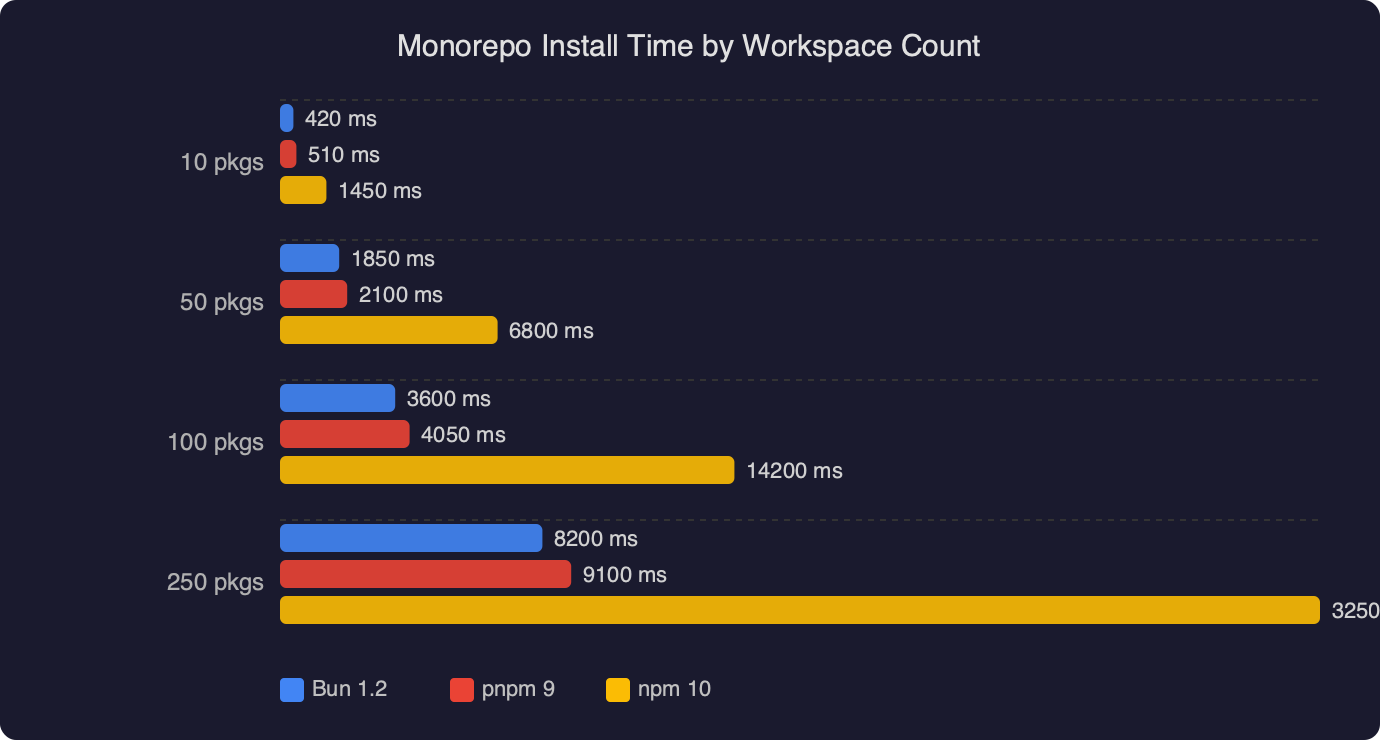
If your repo is already on pnpm and you’re happy with it, the reason to migrate is speed: cold installs on a fresh CI runner typically drop by a meaningful factor, and bun test running against workspace code avoids the Jest startup tax. If you’re on npm or Yarn Classic and you’ve been putting off the move to a real monorepo tool, Bun is now a credible starting point instead of pnpm, with the catalog ergonomics you actually want from day one.
The case against switching is unchanged: if your repo depends on a package-manager-specific plugin that only exists for pnpm, or your CI pipeline is deeply coupled to pnpm fetch and offline installs, stay where you are. Bun’s offline behavior is fine but not identical, and the pnpm fetch-then-install split doesn’t have an exact equivalent.
The practical migration test is small: pick your noisiest package, add Bun to CI alongside pnpm for a week, run both in parallel, and compare lockfiles and build outputs. If they agree, the rest of the repo will agree. If they don’t, the disagreements are almost always phantom deps or a missing entry in trustedDependencies, and both are easy to fix once you see them. The era of “Bun isn’t ready for serious monorepos” is over — the remaining question is whether your specific repo has any of the edge-case tooling that still prefers pnpm, and the answer for most Next.js, Vite, and NestJS codebases is no.