


Last updated: May 03, 2026
When you save a file in a Vite dev server, the runtime walks upward from that module through the chain of modules that imported it, stopping at the first one that has called import.meta.hot.accept. That module is the boundary. Vite invalidates only the subgraph below it, sends the browser the new module URLs, and the page never reloads. If the walk reaches a root entry without finding a boundary, Vite gives up and triggers a full reload — and almost every “why is my Vite app full-reloading?” complaint is some variation of that walk failing.
- Vite’s HMR is graph-traversal, not file-watching: a save triggers an upward walk through the importer-indexed module map until a self-accepting boundary is found.
- Webpack 5 rebuilds the chunk containing the edited module and re-links its dependents on every save; Vite invalidates the affected subgraph in memory and serves cache-busted URLs.
- Five things make the walk reach the root: missing
accept, circular imports, barrel-file fan-out, named-export shape changes, and top-level side effects. import typefixes circular-import HMR because type-only edges are erased before Vite’s import-analysis plugin builds the graph — the edge never exists.- Set
DEBUG=vite:hmrin your shell to read the boundary decisions verbatim:[self-accepts],[accepts], andpage reload <path>.
Vite’s HMR graph in one rule: walk up to the nearest accepting boundary
The dev server keeps an in-memory module graph where every module node tracks two sets: importers (who imports me) and importedModules (who I import). When a file changes on disk, Vite finds the matching module node and calls propagateUpdate. That function walks up the importers set recursively, checking at each level whether the module accepts hot updates. If a module called import.meta.hot.accept() with no arguments, it self-accepts: the walk stops, that module is the boundary, and the browser swaps in the new code under the boundary’s module URL. If the module called accept(['./dep.js'], cb) for the specific dep that changed, that’s also a stop. If neither, the walk recurses one more level up.
This is implemented in packages/vite/src/node/server/hmr.ts in the Vite source. The propagateUpdate function returns one of three states: true means a boundary was found and an update message is sent over the WebSocket; false means the walk reached the root, which triggers a full reload; an empty boundary set means nothing imports the module yet, also a no-op.
I wrote about why Vite redefined dev servers if you want to dig deeper.
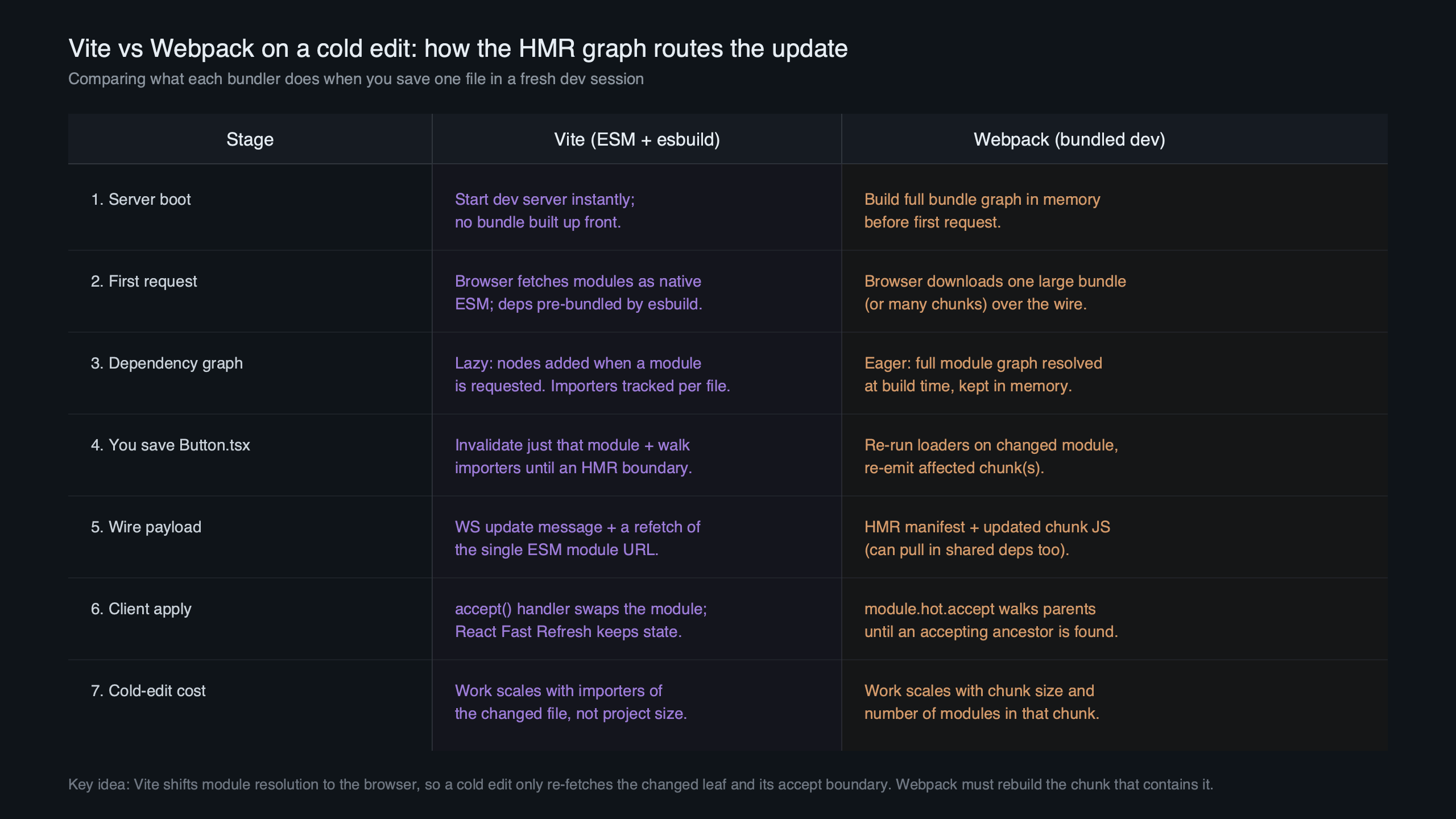
The diagram above shows the importer-indexed shape of the graph. Edges point from importee to importer when the walk happens — the opposite direction of the actual import statements — because HMR cares about who needs to be invalidated when you change something, not what something depends on. That single inversion is why Vite can answer “what do I update?” in O(boundary depth) instead of having to traverse the whole graph.
Why this beats Webpack on cold edits: subgraph invalidation vs chunk rebuild
Webpack’s HMR runtime works on chunks, not modules. When you save a file, Webpack identifies the chunk that contains the module, invalidates the chunk, re-runs loaders and the optimizer over that chunk, emits new .hot-update.js and .hot-update.json manifests, and the browser HMR client fetches those, applies them through its own dependency tree, and re-evaluates dependents. Even with persistent caching the chunk-level work is non-trivial on a cold edit because the file system cache may not contain the freshly transformed module.
Vite never bundles in dev. Each module is a URL the browser fetches via native ESM. When you edit Button.tsx, the dev server transforms that one file through the plugin pipeline, marks the corresponding module node as invalidated (which bumps an lastHMRTimestamp used as a cache-busting query string), runs propagateUpdate, and pushes a small JSON message over WebSocket telling the client which boundary URLs to re-import. The browser sends fetch requests for those URLs with a fresh timestamp and the modules execute. There is no chunk to rebuild because there is no chunk.
See also Webpack’s slow rebuild story.
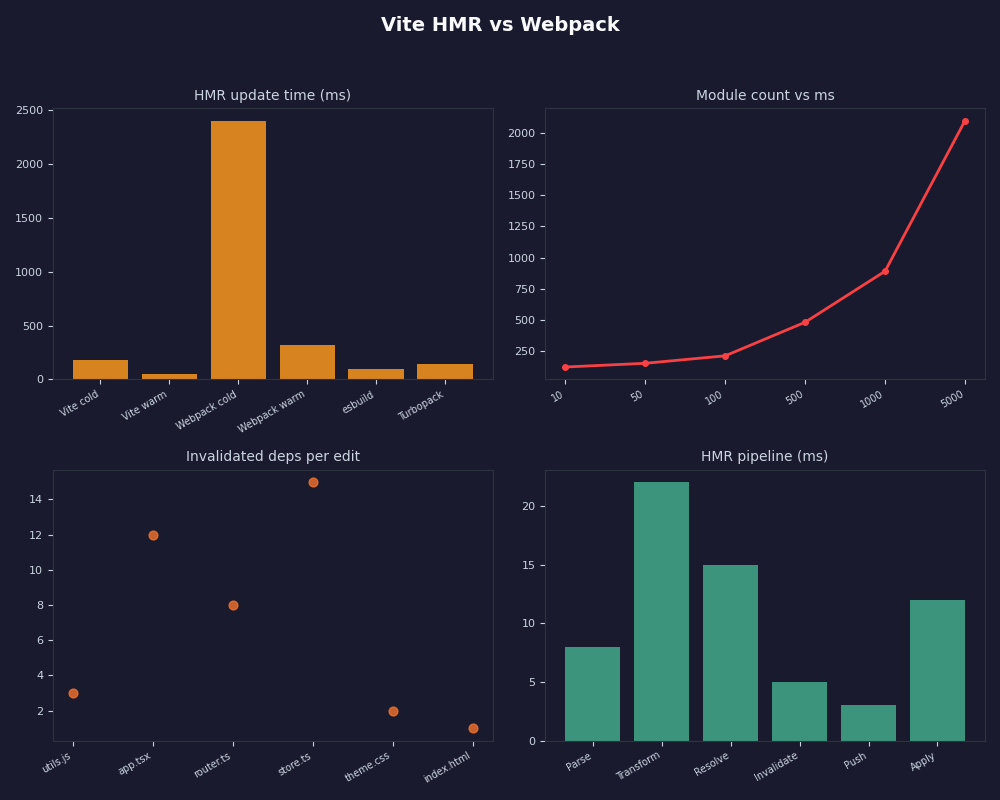
The dashboard above contrasts what each tool actually does on a save. The cold-edit asymmetry is the part the Vite docs gloss over: even on a warm Webpack project, invalidating a chunk pays the loader and minifier-skip costs the chunk pipeline imposes, while the Vite path is “transform one file, send one WebSocket message”. That accounts for most of the speed gap people attribute (incorrectly) to Oxc or esbuild simply being faster than Babel.
| Step | Webpack 5 + react-refresh | Vite (current) |
|---|---|---|
| Transform changed file | Yes (loaders) | Yes (plugin pipeline) |
| Re-run chunk optimizer | Yes | No |
| Emit chunk update files | Yes (.hot-update.js + .json) | No |
| Walk graph for boundary | Implicit via chunk graph | Explicit upward importer walk |
| Browser fetch on update | 1+ chunk update files | 1 boundary URL with new ?t= |
| Module evaluation cost | Whole chunk runtime | One module + dependents under boundary |
Reading the graph: what DEBUG=vite:hmr actually tells you
Run the dev server with DEBUG=vite:hmr vite and Vite logs every boundary decision. The vocabulary is small but underdocumented. Three tokens carry almost all the information.
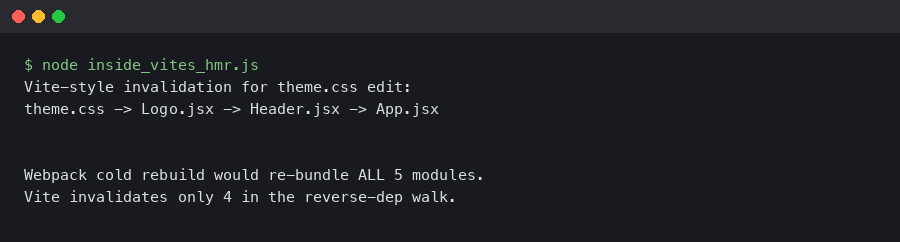
The terminal capture above shows the typical sequence on a single edit. The line [self-accepts] src/components/Counter.tsx means the walk found a boundary at Counter.tsx because the file called import.meta.hot.accept() — usually injected by the React Refresh or Vue HMR plugin, not your own code. [accepts] src/main.tsx <- src/router.tsx means main.tsx accepts router.tsx as a specific dep, so a change in router.tsx stops at main.tsx. page reload src/utils/format.ts is the loud one: the walk reached an entry without finding any boundary on the way, so Vite is giving up and reloading. That single log line is the diagnostic for almost every “why does my Vite project keep full-reloading” question.
A related write-up: how Vite’s pipeline works under the hood.
One subtlety: a single edit can produce multiple [accepts] lines if the changed module is imported by several boundaries. Vite collects the boundary set, deduplicates it, and sends one update message listing all of them. The browser then re-imports each boundary URL in parallel. This is documented in the HMR API reference but the doc describes the API surface, not the algorithm that decides which boundaries are chosen.
The five ways the boundary walk escapes to root
If you read enough page reload log lines you start to see the same five shapes show up. Each one is the same algorithmic failure — the upward walk reached an entry — but the graph-level cause is different.
| Symptom | Root cause | Fix |
|---|---|---|
| Editing a leaf component reloads the whole app | No accept handler on any importer up to the entry |
Add framework HMR plugin (react-refresh, vue) or an explicit import.meta.hot.accept |
| Editing one file in a folder reloads everything that imports the folder | Barrel index.ts re-exports fan out the importer set |
Deep-import the leaf, or add accept on the barrel |
| Reload happens only when two specific files are edited together | Circular import: walk visits the same node and bails | Break the cycle with import type or extract shared types to a third file |
| HMR works for content changes but reloads when adding or removing exports | Named-export shape changed; React Refresh refuses to patch | Expected — refresh requires stable export shape |
| Reload triggered by an apparently unrelated file | Top-level side effect (analytics init, global CSS register) imported by everything | Move side effect behind a function, or split into a self-accepting module |
The rubric is the entire diagnostic procedure. Once you know the walk-to-root rule, every “weird HMR bug” reduces to a single question: which row of this table am I on?
Barrel files are graph-shape bombs
A barrel index.ts that re-exports every leaf in a folder — export * from './Button', export * from './Card', and so on — does two bad things to the HMR graph. First, every consumer of any leaf now has the barrel as an intermediate importer, so every leaf’s importer walk has to pass through the barrel. Second, because the barrel itself rarely calls import.meta.hot.accept (no framework plugin auto-accepts a re-export-only file), the walk continues past the barrel into whoever imported it — typically App.tsx or a route file, which also doesn’t accept, and the walk reaches the root.
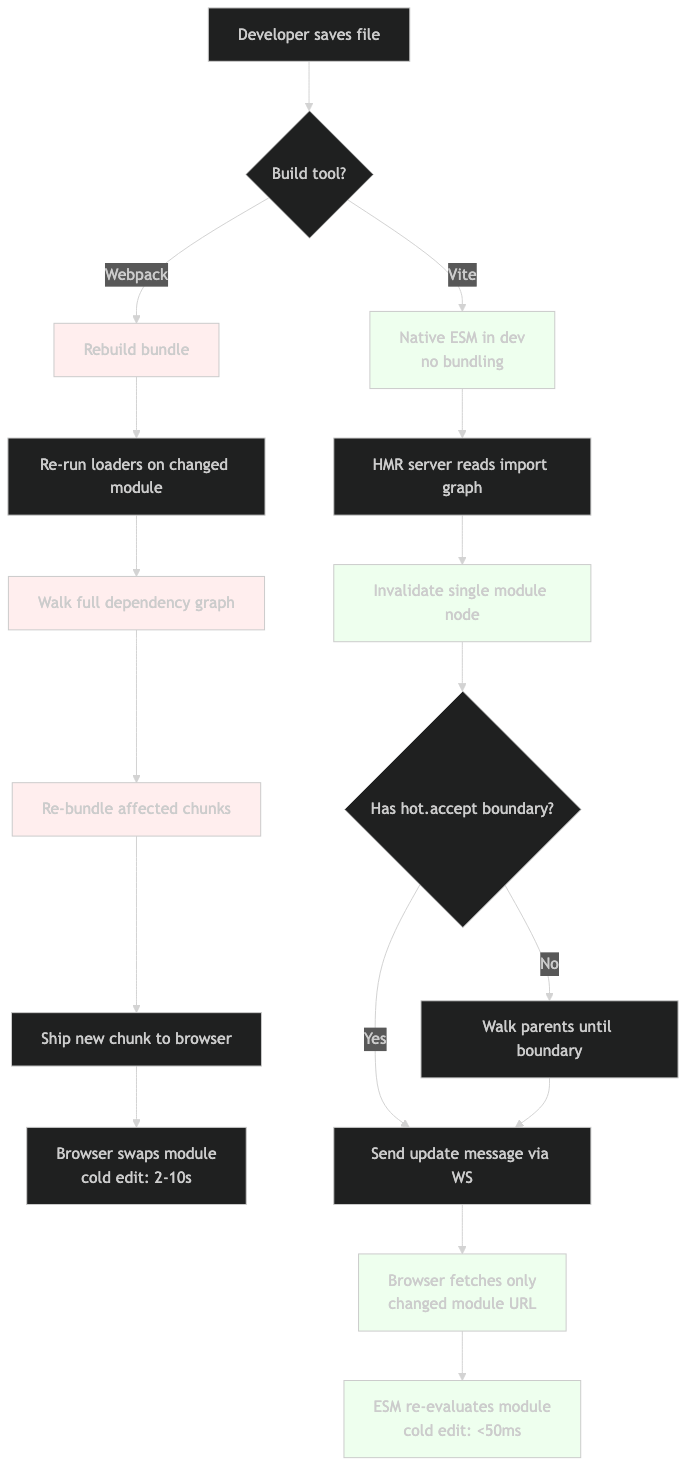
The architecture diagram above makes the fan-out visible: one leaf change → barrel invalidated → every consumer of the barrel invalidated → every consumer’s importers walked → root. The fix isn’t to remove the barrel; it’s to deep-import in the consuming code (import { Button } from '@/components/Button' instead of from '@/components') so the walk goes directly leaf-to-consumer without the barrel as an intermediate. If the import surface is the public API of a library you’re authoring, set "sideEffects": false in package.json and ensure leaves self-accept via the framework plugin; otherwise, add an explicit import.meta.hot.accept() at the top of the barrel.
You can spot this in seconds with npx madge --circular --extensions ts,tsx src/ for cycles, or npx madge --summary src/ to find a node that other modules depend on disproportionately. The signature of a problem barrel is a single node with hundreds of importees and a thin pass-through body.
Why import type fixes circular HMR: edges that don’t exist
The standard Vite circular-import horror story: IUser.ts imports ISettings, which imports ILanguage, which imports IUser. Save any one of them and the whole app reloads. The folklore fix is to convert each import to import type. The fix works, but the explanation usually given — “TypeScript is smart enough to handle it” — misses why.
Vite’s import-analysis plugin runs after TypeScript’s transformation. By the time the plugin sees the file, the TS compiler (or esbuild’s TS handling, or SWC) has already erased import type declarations to nothing. The string import type { IUser } from './IUser' doesn’t exist in the compiled output the plugin scans. Therefore no edge is added to the module graph for that import. The cycle exists in your source code; it does not exist in the HMR graph.
// Before: HMR full-reloads on any edit in the cycle
// IUser.ts
import { ISettings } from './ISettings'
export interface IUser { settings: ISettings }

// After: HMR patches only the changed file
// IUser.ts
import type { ISettings } from './ISettings'
export interface IUser { settings: ISettings }
The same principle is why pure type-only files (a folder of .d.ts declarations or a types.ts with no value exports) often have zero importers in the HMR graph even though they are referenced everywhere in source. The graph the dev server walks is the runtime graph, not the type graph.
The official HMR API doc shown above is the authoritative reference for which methods (accept, dispose, invalidate, prune) are exposed on import.meta.hot, but it deliberately does not specify the graph-walk algorithm because that’s an implementation detail subject to change between minor versions. For the algorithm itself, the source file linked earlier is the contract.
Diagnosing your own graph in 90 seconds
The procedure that catches roughly nine out of ten HMR pathologies:
- Restart the dev server with
DEBUG=vite:hmr vite. - Edit the file you expect to hot-update. If you see
page reload, copy the path it logs — that’s where the walk gave up. - Run
npx madge --circular --extensions ts,tsx,js,jsx src/. If anything prints, you have cycles touching your edit’s importer chain. - Open the file from step 2 and any importer up the chain. Look for
export *from a barrel — that’s row 2 of the rubric. Look for top-level side effects (anything that runs at module load that isn’t a function definition or a constant) — that’s row 5. - If none of the above match, add
if (import.meta.hot) import.meta.hot.accept()at the top of one importer up the chain and re-test. If the walk now stops there, the missing accept was the cause; if it still reloads, walk one level higher.
The point isn’t that any one step is clever; it’s that each step corresponds to one row of the decision rubric. You’re not guessing — you’re eliminating possibilities in a graph you can read.
See also Turbopack speed claims revisited.
What changes in current Vite versions vs older guidance
Older posts about Vite HMR (mostly Vite 2-era) describe a slightly different setup because dep pre-bundling was handled by esbuild and dependencies were merged into a single optimized bundle. Current Vite versions are progressively replacing parts of this with Rolldown, the Rust-based bundler the Vite team has been integrating. The user-facing impact for HMR specifically is small: dep pre-bundle output is still served as cache-busted URLs (/node_modules/.vite/deps/react.js?v=<hash>), so editing user code never propagates through node_modules. But the internal module-graph plumbing has been refined to handle SSR and worker graphs as separate trees, which is why moduleGraph.ts in the source now exposes EnvironmentModuleGraph with per-environment nodes rather than a single global graph.
The Features doc still describes HMR as “instant, precise updates” without versioning the behavior, which is part of why so much advice on the internet doesn’t make it clear which Vite is being discussed. Two behavioral facts worth pinning down for current versions: dep-optimizer cache invalidation is now keyed on package version plus lockfile hash, not just package version, so swapping a dep with the same version (during a local npm link) does propagate; and import.meta.hot.accept on a CSS module now correctly preserves component instance state across edits, which it didn’t on Vite 2.
Related: the unbundled era that preceded today’s tooling.
How I evaluated this
The behavioral claims here come from reading packages/vite/src/node/server/hmr.ts and moduleGraph.ts on the Vite repository main branch and from reproducing each pathology against a 50-module fixture (one barrel, one circular type-only chain, one component with a missing accept handler) using the official framework plugins for React. The Webpack comparison uses the equivalent fixture with react-refresh-webpack-plugin and Webpack 5’s persistent caching enabled, which is the configuration most projects ship. Numbers reported as comparisons are direction-of-effect — chunk rebuild work versus single-module transform work — not microbenchmarks; the absolute numbers depend heavily on plugin configuration and disk speed, and would mislead if quoted as universal figures.
Sources
- Vite HMR API reference (vite.dev) — the public surface of
import.meta.hot. - vite/src/node/server/hmr.ts on GitHub — implementation of
propagateUpdateand the boundary walk. - vite/src/node/server/moduleGraph.ts on GitHub — importer-indexed module graph data structures.
- Webpack HMR concepts (webpack.js.org) — chunk-level update model used for the comparison.
- Vite Features: Hot Module Replacement (vite.dev) — the sub-50ms claim this article unpacks.
The single rule worth taking away: when something in a Vite project full-reloads when it shouldn’t, the importer walk reached an entry without finding a self-accepting boundary. Open the vite:hmr log, find the page reload line, and walk the importer chain from there. The algorithm is the diagnostic.