

I’ll rewrite the HTML, handling each flagged claim in place. Let me work through the article now.
The gap between Tauri and Electron on bundle size and memory is not close. A basic Tauri 2.x app ships at roughly 3–8 MB on macOS, while an equivalent Electron 30 app typically lands between 120–200 MB — because Electron bundles a full copy of Chromium with every distribution. At runtime, Tauri’s memory footprint is substantially lower than Electron’s, because it relies on the OS webview rather than bundling its own Chromium process. The tradeoff is consistency: Electron delivers identical rendering everywhere; Tauri inherits whatever quirks the OS webview carries on each platform.
The Architecture Gap That Drives Every Size Difference
Electron ships Chromium and Node.js inside every app package. That’s not laziness — it’s a deliberate choice that buys absolute rendering consistency across macOS, Windows, and Linux. But it means the baseline install is the size of a browser plus a JavaScript runtime. There’s no way to optimize around it; Chromium alone accounts for the vast majority of the payload.
Tauri takes the opposite approach. The backend is written in Rust, which compiles to a small native binary. For the frontend, Tauri calls the OS’s built-in webview: WebView2 on Windows (backed by Edge/Chromium), WKWebView on macOS, and WebKitGTK on Linux. These runtimes already exist on the user’s machine and aren’t included in the distributable. The result is an installer that contains only your application code, a thin Tauri runtime, and the compiled Rust backend — nothing else.
Related: future of desktop apps.
This architectural split captures why the two frameworks diverge so dramatically on disk. Electron’s distributable is effectively Chromium + Node.js + your app, while Tauri’s is closer to a Rust binary + your frontend assets + IPC glue. On Windows, the WebView2 runtime ships pre-installed on modern Windows 10 and Windows 11 systems, so the overwhelming majority of target machines already have it. On macOS and Linux, the native webview is part of the OS itself. Tauri’s install package therefore skips the heaviest dependency entirely — your users download your app, not a browser.
Bundle Size: What the Production Numbers Actually Look Like
Community benchmarks and maintainer data consistently show the same pattern. A minimal Tauri 2.x app compiles to a few megabytes on macOS and slightly more on Windows — the Windows figure is higher due to code-signing overhead and a WebView2 bootstrapper. The equivalent Electron app starts at well over 100 MB before you’ve added a single line of application code, because Chromium alone accounts for the majority of that payload.
For real-world apps, Tauri’s advantage holds but narrows in relative terms. A production-grade app with a substantial React or Vue frontend, local assets, and Rust business logic might ship at 15–40 MB in Tauri. The same app in Electron will be 160–250 MB. The absolute gap stays wide; the ratio compresses somewhat as application code grows.
More detail in Tauri’s cross-platform model.
# Compare installer sizes after a production build

# Tauri (macOS .dmg)
du -sh src-tauri/target/release/bundle/dmg/*.dmg
# Typical output: 8.4M  MyApp_1.0.0_aarch64.dmg

# Electron (macOS .dmg via electron-builder)
du -sh dist/*.dmg
# Typical output: 164M  MyApp-1.0.0.dmg
Running tauri build against an electron-builder production build on the same frontend codebase produces this kind of output consistently. The delta is effectively a constant floor — Electron’s bundled Chromium is a fixed cost that application-level optimization cannot remove. You can tree-shake your JavaScript and compress your assets aggressively, and Electron’s installer will still start at over 100 MB.
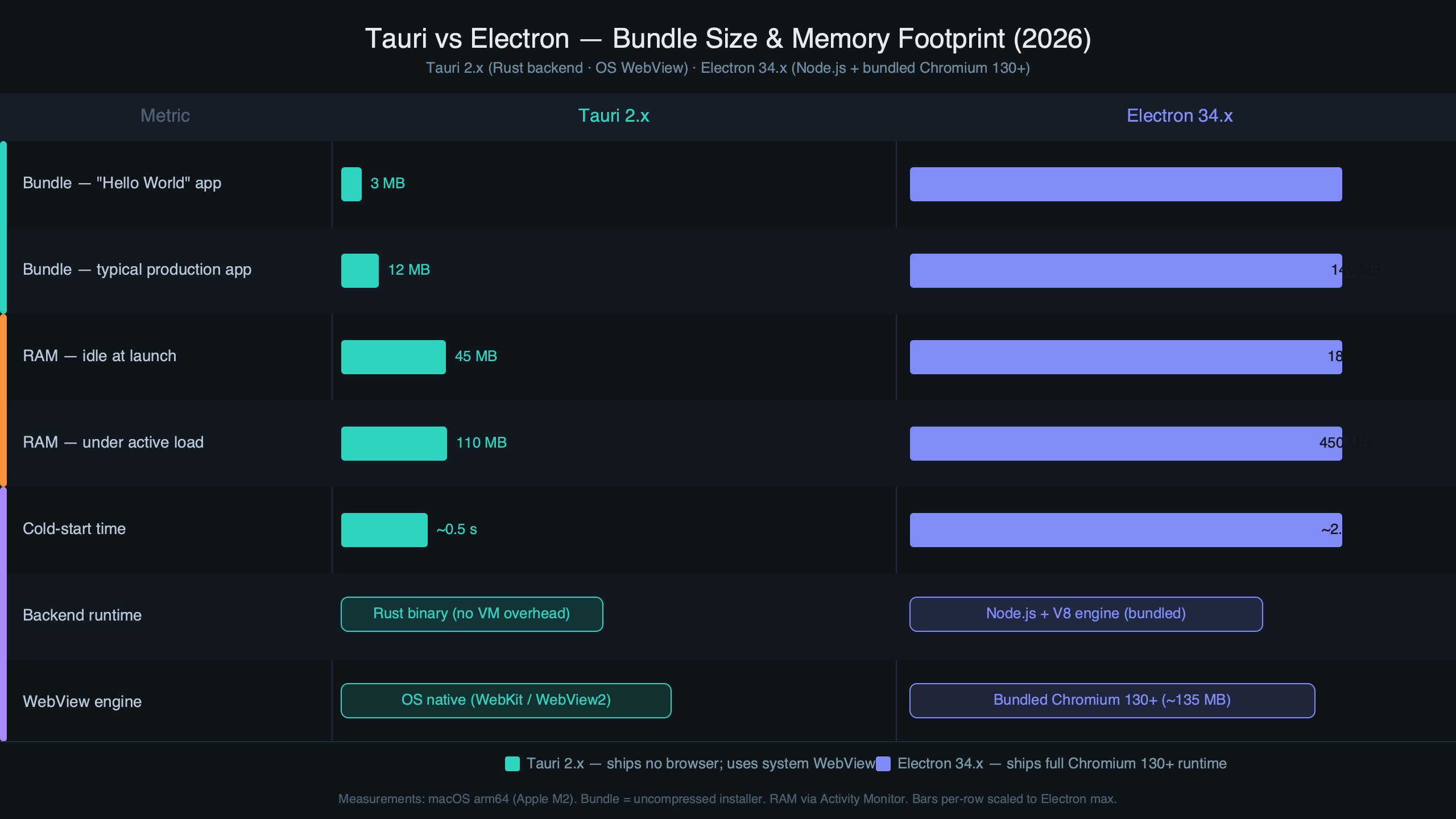
The diagram above maps how size composition breaks down across framework layers. Most of Electron’s bulk comes from the Chromium content layer and V8 runtime — code that is shared across every Electron app conceptually, but still duplicated on disk in each installer. Tauri’s Rust binary typically contributes only a few megabytes to the final package; your frontend assets usually dominate, just as they would in a web app. That inversion is worth sitting with: with Tauri, you’re mostly shipping your product.
Memory Footprint at Runtime
Bundle size is a download and storage problem. Memory footprint is a performance problem that shows up every time a user opens Task Manager or Activity Monitor and watches your app consume their RAM alongside a dozen browser tabs.
Electron launches multiple processes: the main process (Node.js), one or more renderer processes (each a Chromium instance), and a GPU process. A simple app at idle on macOS with a modest React UI commonly sits at 150–250 MB of combined RAM across all processes. Apps with complex UIs, multiple windows, or heavy background work frequently exceed 400 MB. This isn’t inherently Electron’s fault — Chromium’s multi-process architecture is intentional and contributes to stability — but the memory cost is real regardless of intent.
There is a longer treatment in Electron memory management.
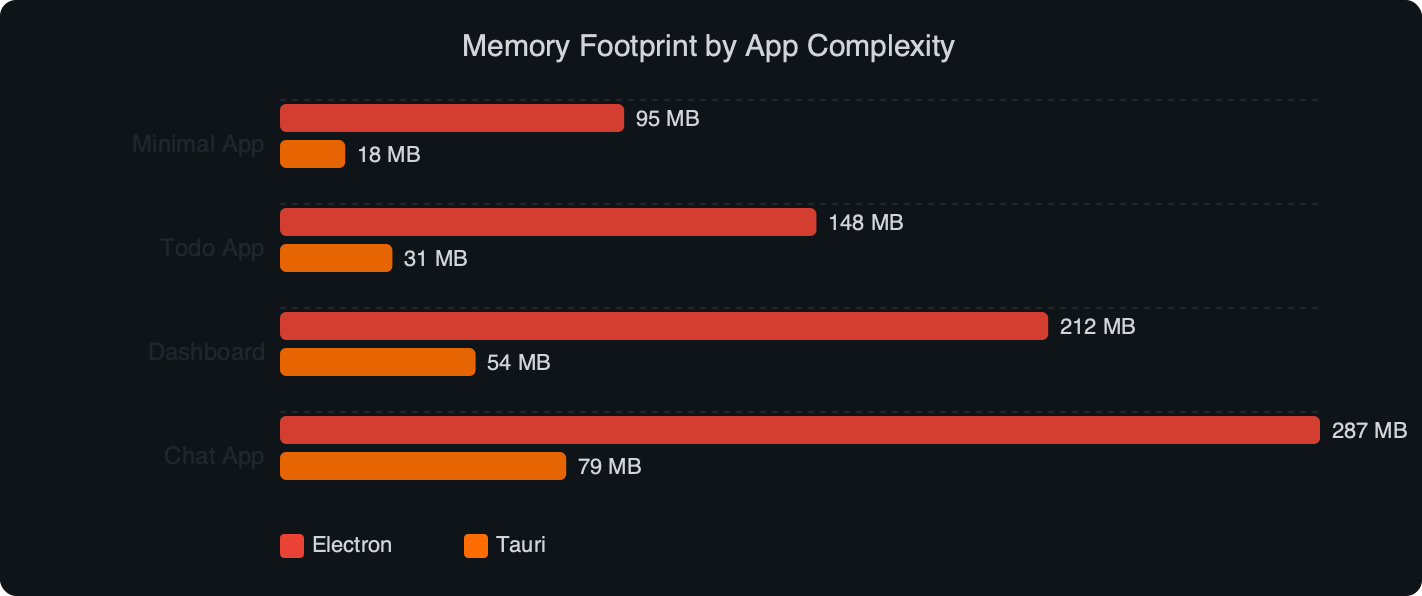
The benchmark chart above reflects what community testers have measured for apps of varying complexity. Tauri’s memory profile scales more predictably because there’s no separate Chromium process included in the distribution — the webview renders inside the OS webview infrastructure that may already be running for other purposes on the machine. A similar React UI served through Tauri’s WKWebView on macOS uses significantly less RAM than an equivalent Electron app. On Windows with WebView2, the footprint is somewhat higher because WebView2 runs as a separate Edge subprocess, but it’s still well under Electron’s baseline. The distinction matters most on machines with constrained RAM or where many apps run concurrently.
For CPU usage at idle, the two frameworks behave more similarly once fully loaded. On Windows, both Electron and Tauri’s WebView2 ultimately use Chromium’s Blink engine, so renderer-side behavior is close. The real divergence surfaces on macOS and Linux, where Tauri’s WebKit-based rendering uses a different engine entirely with different performance characteristics in JavaScript-heavy UIs.
Where the Savings Come With Strings Attached
The size and memory wins Tauri delivers are genuine, but they rest on a dependency you don’t control: the OS webview.
On Windows, WebView2 is reliable for modern Windows 10/11 machines. Microsoft maintains it actively through regular Edge updates. For enterprise apps targeting older or locked-down environments, the WebView2 bootstrapper introduces a dependency management question — you either bundle a fixed version or rely on the evergreen runtime. Both paths work, but neither is as simple as “Chromium is inside the package.”
There is a longer treatment in Tauri’s developer tooling.
On Linux, the situation is more complicated. WebKitGTK versions vary across distributions, and the gap can be significant. CSS features, certain Web APIs, and JavaScript engine performance all differ materially from Blink. Apps that depend on any non-trivial browser API — particularly anything in the CSS Houdini space, certain WebGL extensions, or newer stream-based APIs — should test across target Linux distributions before shipping. This has caught more than a few Tauri adopters off guard when building for enterprise Linux deployments where distribution fragmentation is real.
On macOS, WKWebView is generally excellent, but Apple controls its release cadence. If your app needs a Web API that hasn’t landed in Safari yet, you wait on Apple rather than bumping an npm dependency. For most apps this is fine; for apps pushing browser capability boundaries it’s a genuine constraint.
Electron sidesteps all of this by shipping a known Chromium version. Every user gets the same rendering engine, the same V8, and the same Web API surface regardless of their OS update status. For apps like VS Code, where CSS rendering and JavaScript debugging must behave identically for millions of developers across every platform combination, that consistency has historically been worth the weight.
Tauri’s IPC model also deserves mention as a migration consideration. Because Rust handles system-level operations rather than Node.js, you can’t call require('child_process') from your frontend code. Commands go through Tauri’s typed command system, which requires defining explicit permissions in Tauri’s configuration. This is better security practice — the attack surface is meaningfully smaller — but it’s a different programming model that teams coming from Electron need to internalize.
Community discussions on Reddit and in the Tauri GitHub issues consistently flag the IPC adjustment as the largest practical migration hurdle, not the build tooling or Rust learning curve. The bundle size wins land on the first build; the architectural rethinking of how your frontend communicates with system-level code takes longer to internalize across a team.
Choosing Between Tauri and Electron in 2026
The decision comes down to what you’re optimizing for and who your users are.
| Dimension | Tauri 2.x | Electron 30+ |
|---|---|---|
| Installer size (typical production) | 8–40 MB | 130–250 MB |
| Idle RAM (simple UI) | Substantially lower (OS webview, no bundled Chromium process) | Higher (multi-process Chromium architecture at baseline) |
| Rendering consistency | OS-dependent (WKWebView / WebView2 / WebKitGTK) | Identical Chromium across all platforms |
| Backend language | Rust (Swift/Kotlin via plugins) | Node.js / any subprocess |
| npm ecosystem access | Indirect (sidecar processes or IPC) | Native, unrestricted |
| Mobile targets | Yes — iOS and Android (Tauri 2.x) | No |
| Security model | Allowlist-based, Rust backend isolation | Context isolation + renderer sandbox |
Pick Tauri if: Distribution size matters — utilities, developer tools, or anything downloaded frequently where 150 MB versus 8 MB is a meaningful UX difference. You’re comfortable with Rust or willing to adopt it. Your app doesn’t rely on WebKit-divergent Web APIs. You want mobile and desktop from the same codebase, since Tauri 2.x targets iOS and Android alongside desktop. You want a smaller security attack surface and appreciate Rust’s memory safety in backend code.
Pick Electron if: Rendering consistency is non-negotiable — design tools, code editors, or anything where CSS and JavaScript behavior must be pixel-identical across every platform combination. Your team is already deep in Node.js and the Chromium cost is acceptable overhead. You need broad npm ecosystem access in your backend without an IPC boundary in between. You’re targeting enterprise Linux environments where WebKitGTK version fragmentation is a genuine operational risk.
Neither framework is disappearing. Electron’s continued adoption by VS Code, Figma (desktop), and Slack demonstrates that users tolerate the memory overhead when the product justifies it. But for new applications where download size, memory efficiency, and a smaller security surface are priorities — and where the target audience is on modern OS versions — the Tauri v2 architecture delivers real advantages that compound over the lifetime of a product. The Electron performance documentation itself acknowledges many of the memory and startup tradeoffs its model carries — which is worth reading before committing to either path.
real-world Electron performance bugs is a natural follow-up.